Embedding Twitter videos: the code, the display options and the fixes
Twitter video showing as plain text? To embed Twitter video posts, pick Embed post on x.com, copy X's code and paste it in HTML view.

You embed a Twitter video by embedding the X post it lives in, using code that X writes for you on publish.x.com.
Embed a Twitter video by copying the code X generates for its post and pasting it into your page's HTML.Open the post on x.com and choose Embed post from its three-dot menu.Click Copy Code once publish.x.com shows the embed.Paste the code into your site's HTML or code view, not the visual editor.
The walkthrough below adds the wider video option, the settings worth changing, what the code contains, and how to fix an embed that shows only text.
How to embed a Twitter video in three steps
Three moves take a clip from X to your page, and each one comes from X's help on embedding:
- Open the post on x.com and click the three-dot menu at its top right.
- Choose Embed post. publish.x.com opens with the code ready and a set customization options link for changing the look.
- Press Copy Code and paste the code into your page through your editor's HTML or code view, then publish.
Where you paste matters more than it looks.
The code carries a script along with the post's text, and an editor that refuses scripts drops it without warning, which leaves an embedded Twitter video showing up as plain text.
Embedding an X video from a phone
Embed post doesn't exist in the X apps, because X's help limits embedding to X.com.
A phone still works:
- Grab the post's link through the app's share menu.
- Load publish.x.com in any mobile browser.
- Drop the link into the box that asks what you'd like to embed.
Embedded Post or Embedded Video: how the X clip should appear
Paste a post's link into publish.x.com and the tool answers with "Here are your display options": Embedded Post and Embedded Video.
They put the same clip on your page inside the same post card, at two different widths.
Embedded Post shows the whole post card: the author's name and handle, the X logo, the text, the date and the action row, with the video playing inside. X's developer FAQ says this format adjusts to its container between 220 and 550 pixels wide, so it reads like a quote set into your article.
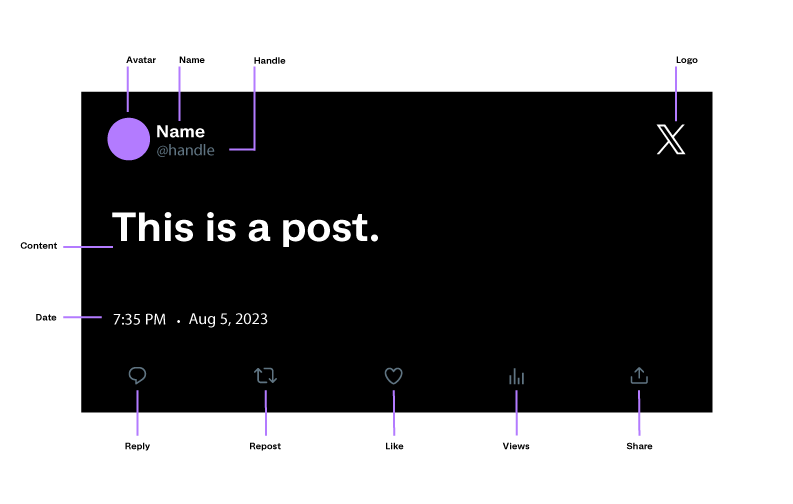
Embedded Video keeps that card and lets the video inside it play wider. The tool describes it as the best way to display video-only content or live broadcasts, and it asks for a width between 560 and 1,920 pixels.
Which display option fits your Twitter video
Choose by how much room the clip deserves.
Embedded Post fits when the post's words matter as much as the clip, such as an announcement or a reaction you're writing about.
Embedded Video fits when the clip is the content, like a product demo or a tutorial, and your layout has room for a wide player.
X's help describes only the Embed post route, which gives you the standard size. To embed Twitter videos at the larger size, paste the post's link into publish.x.com yourself and pick Embedded Video from the display options.
The same tool also builds Embedded Timeline, a different format for a different job: it shows a stream of posts from a profile or a List, which suits a page meant to collect many clips rather than feature one.
Paste the X link instead of the code
Some site builders skip the code step entirely.
X's developer documentation lists three routes to an embedded post:
- Copy the markup from the post menu on x.com.
- Paste the post's URL into a CMS that supports it.
- Add the post to the page with a JavaScript function.
The URL route runs on X's oEmbed endpoint, which turns a post link into the same embed code behind the scenes. X's CMS best practices call a post URL added to the article content the simplest macro an editor can offer.
So before copying anything, check whether your editor has an embed option that accepts a link. If it does, paste the post's address there and preview the page to confirm the player appears.
Settings to change before copying the Twitter video code
The set customization options link opens a short list of prompts, and a few of them change how the clip sits on your page:
- "How would you like this to look?" switches the embed between Light and Dark.
- "Would you like to limit context in this Post?" holds Hide Conversation, which removes the post a reply answers.
- "What language would you like to display this in?" sets the embed's own labels, not the post's text.
- "Opt-out of tailoring X" keeps the embed and your page out of X's personalized suggestions and ads.
- "What width would you like for the video?" appears for Embedded Video, from 560 to 1,920 pixels.
Copy the code after your last change, because the settings are written into the code itself.
One layout choice isn't among the prompts: alignment.
X's developer documentation says an embedded post sits on the left by default and can be centered or right-aligned with its align setting, written as data-align in the code. X calls that the officially supported method, rather than CSS workarounds.
What's inside the code X gives you for a Twitter video
The code is two pieces, and neither of them is an iframe.
X's developer documentation describes an embedded post as an HTML snippet in your page plus X's JavaScript, which turns the snippet into the full post when the page loads.
In shortened form, the code looks like this:
<blockquote class="twitter-tweet">
  <p>The post's text</p>
  <a href="https://x.com/handle/status/POST_ID">Date</a>
</blockquote>
<script async src="https://platform.x.com/widgets.js" charset="utf-8"></script>
The blockquote is ordinary HTML, so any page can display it. The script is what turns it into a playable post, which is why a missing script leaves text behind instead of an error message.
Embedded Video writes the same code with one addition: a data-media-max-width value on the blockquote, set to the width you chose.
The script tag carries the async attribute, so the browser keeps loading the rest of your page while it fetches X's code.
Pages that insert embeds after loading, such as single-page apps, need one more step: the developer documentation says to call X's twttr.widgets.load() function after the new content goes in.
Why wrapping the X video in an iframe is the wrong fix
That design also rules out a tempting workaround. X's developer guidelines list "No iframes" among the rules for displaying X content and point to the official embeds instead.
If your site's editor can't hold scripts at all, the developer FAQ offers a site-wide fix. Load X's widgets script once in the page template, right before the closing body tag, and every embed pasted afterward has what it needs to render.
Why an embedded X video won't show on your page
Start with what the page actually displays:
- Plain text with no post card means X's script never ran or the post is gone.
- A full post card with no video points to the code's settings.
- A clip that fails on x.com too points to the browser.
I check embeds in a private browser window first, because it shows the page the way a visitor who isn't logged in to X sees it.
The editor stripped X's script
Rich-text editors can strip scripts from pasted HTML, as X's developer FAQ notes. Paste the code again in an HTML, text or code-editing mode, then check the published page, since an editor's preview may not run the script.
The X post was deleted, protected or suspended
X's embedding help covers this case: if the author deletes the post, protects their posts or has the account suspended after you embed it, the text stays visible but X's script stops loading the media.
The clip won't come back unless the post does, so swap in another post or remove the embed.
publish.x.com also refuses such posts up front, with the message "Sorry, we can't create an embed for that. It may have been deleted or made private." Protected accounts are ruled out even earlier, since X's help says their posts have no embed code at all.
The code tells X to hide the media
A post that renders fully but without its video may have media turned off in the code. X's documentation explains that data-cards="hidden" on the blockquote, or hide_media=true in an oEmbed request, stops photos, videos and link previews from displaying.
Remove the attribute, or the setting that adds it, and reload the page.
The video won't play on x.com either
Sometimes the page is fine and the browser is the problem. If the clip also fails on x.com in the same browser, your embed code isn't the cause.
X's video help, writing about live video, suggests:
- A strong connection.
- A different network or browser.
- Reopening the browser.
- Keeping the browser up to date.
Those checks are the place to start with any clip that won't play.
Worried an embedded X video could disappear?
It can, and that's the fair objection to embedding. The video stays on X under its author's control, so a deleted post or a locked account leaves your page with words and no clip.
For your own videos, that risk sits with you, so embed freely.
For someone else's clip, embedding is still the route X builds for it: the post stays credited to its author and plays from X rather than from a copy on your server.
X's own Download video option isn't open to everyone anyway. X's video help limits downloads to Premium subscribers, and only from posts whose uploaders allow it.
Pick the post, decide between the standard card and the wider player, and paste the code in HTML view.
One look at the published page tells you whether the script made it through.
Embedding X videos: three more questions
Can you share someone's X video in your own post without quoting it?
X's help center doesn't document a way to do it. Many users paste the video's own address, the post's link ending in /video/1, into a new post, which shows the clip with a credit to its uploader.
The X app offers a similar option when you press and hold a video, but treat both as app behavior that can change.
Can you embed a live X broadcast on a website?
Yes. publish.x.com describes Embedded Video as the best way to display video-only content or live broadcasts.
X's video help adds that its embedded live video widget relies on cookies from twimg.com, an X domain, so visitors who block third-party cookies can't play it until they allow that cookie.
Does an embedded Twitter video add to the post's view count?
No. X's help on view counts says embedded posts will not add to view counts, which only include people logged in to X who view the post.