
Can I delete my Twitter account without waiting 30 days on X?
Can I delete my Twitter account without waiting 30 days? X says no. This page explains why the window is fixed and what to do now so your posts, handle and apps are dealt with before it ends.


No, and X documents no way around the wait. What you can control is how much of your account is visible, and how much is left, while the clock runs.
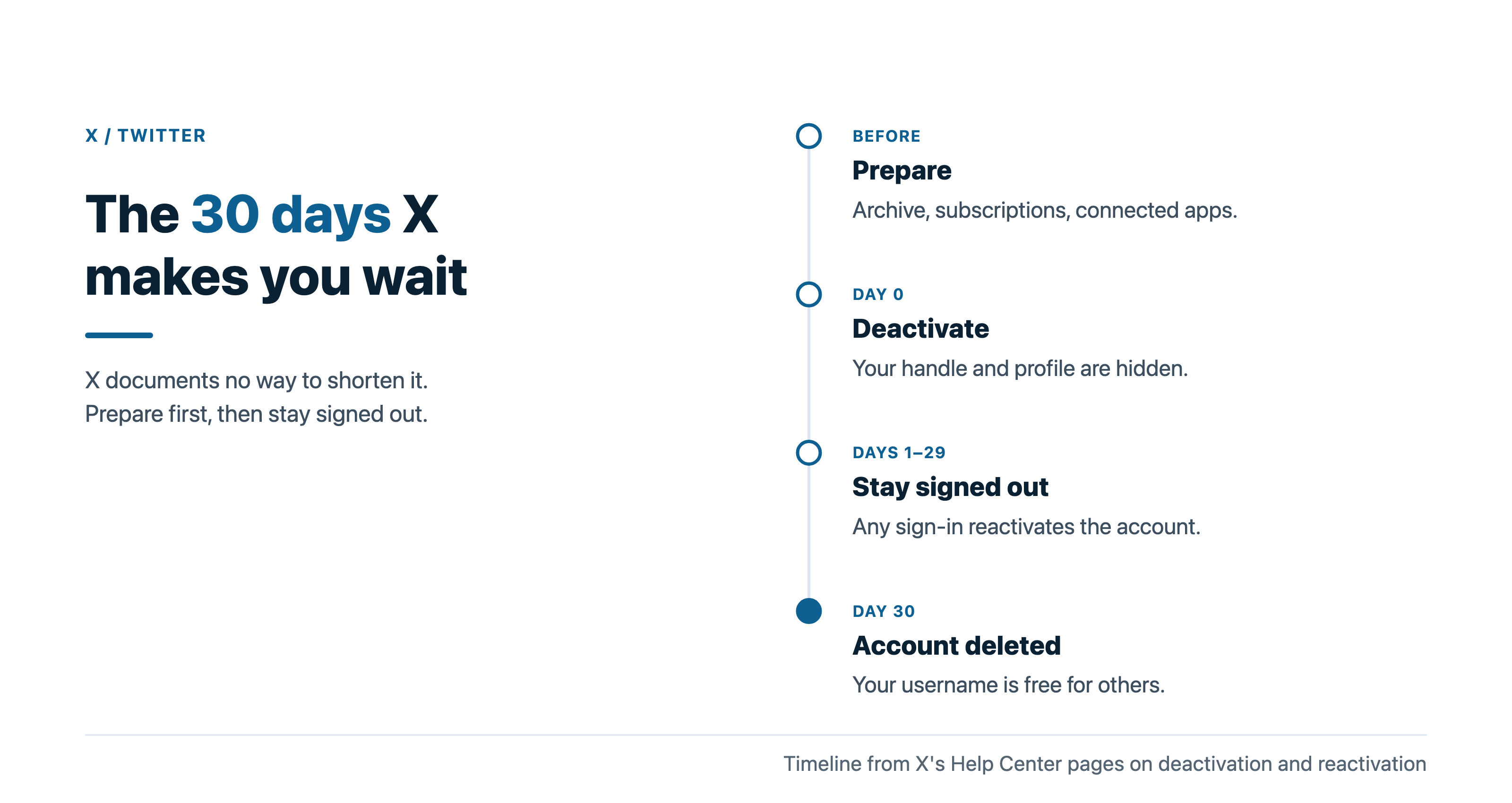
Short answer: no, you can't delete your Twitter account without waiting 30 days. X deletes an account only after it has stayed deactivated for that long, and it documents no way to shorten that window. The catch: deactivation hides your handle and public profile as soon as it takes effect, so the wait only matters if something signs you back in or you left posts and a username you still care about.
Below: why the window is fixed, what X keeps during it, and what to do before and during the 30 days.
Why X makes you wait 30 days to delete a Twitter account
Twitter is now X, and X has one route to closing an account. Its help page on deactivating your account puts it plainly: deactivation is the first step to deleting your account permanently, and it lasts 30 days.
There is no separate delete button. Deletion is what happens when you leave the account alone for the whole window.
X gives its reason in one line. The window gives you space to decide whether you would like to reactivate.
So the honest answer to can I delete my Twitter account without waiting 30 daysis no. The good news is that the account stops being public long before the 30 days end.
What deleted means on X once the window closes
Deletion is final in the ways that matter to you. X says that once the account is deleted, it is no longer available in its systems, you can't reactivate it, and you won't have access to any old posts.
Your username changes hands too. After deletion, X says it becomes available for registration by other X accounts.
One limit is worth knowing up front. X notes that it may retain some information on a deactivated account for the safety and security of its platform.
So deletion ends your account. It is not a promise that every record of it is gone from X's side.
What people see while your Twitter account waits out the 30 days
Very little. X says deactivating means your username and public profile will not be viewable on x.com, X for iOS or X for Android.
Your data still sits with X during that time. X states that deactivating your account does not remove data from X systems, which is exactly what makes reactivation possible.
A few things stay where they are:
- Mentions: your username in other people's posts still exists, but it no longer links to your profile.
- Direct Messages: X says they won't be deleted during the 30-day period.
- Your handle and email: they stay tied to the deactivated account so you can come back.
For most people leaving, that is enough. The account is out of sight on day one.
Is there any way to speed up Twitter account deletion?
Not that X documents. Its deactivation page, its reactivation page and its troubleshooting page all describe the same 30-day window, and none of them offers a request that shortens it.
X does have a form for account deactivation, but it serves a different case. It exists for suspended or locked accounts that can't be deactivated from settings.
Waiting is the only path. Treat the 30 days as preparation time, not dead time, because most of the useful work happens before or during the window, not after it.

Delete your posts first if they need to go now
Deactivation hides posts. If you want specific posts gone for good, deleting them yourself is faster than waiting for the account to go.
X's page on deleting X posts explains what one deletion does. The post leaves your account, the timelines of your followers and X search, and reposts of it are removed too.
The catch is volume. X says it does not provide a way to bulk-delete posts, and you can only delete posts manually, one by one.
Outside apps that offer bulk deletion work through X's API, which deletes one post per request on the account owner's behalf.
Before you give one access, check what permissions it asks for, keep your own archive first, and revoke its access when the job is done.
Deleting tweets or the whole account: which one do you need?
Some people searching for a faster deletion only want their history gone. If the account itself is fine and the posts are the problem, deleting posts keeps your followers and your handle.
The reverse is also true. If you are done with X entirely, cleaning posts first is optional, because the account and its posts go together at the end of the window.
If you are still deciding, this comparison of deleting tweets vs deleting your whole Twitter account sets the two options side by side.
Pick one before you start. Deactivating first and then cleaning posts means signing back in, which cancels the deactivation.
Free your username and email before you deactivate
Your handle and email stay locked to the deactivated account for the full window. X's page on reactivating your account says they become available for use on another account 30 days after deactivation.
If you want either one sooner, change it before you deactivate. X says you don't have to delete your account to change the username or email, and you can update them in Account information at any time.
There is a trade-off. X's page on changing your username says your previous username will immediately be available for use by someone else.
So renaming frees the old handle at once, for anyone. Only do it if you are moving the handle to an account you control right away.
X's own fresh-start trick for Twitter accounts
Some readers want deletion because they want a clean slate under the same name. X documents a way to get that without the wait.
Its tip is to create another account with a temporary username, and then switch the username between your current account and the new account.
The new account starts empty, and the name you care about moves to it. The old account can then be deactivated under the temporary name.
This doesn't make deletion faster. It makes deletion matter less, because the identity you want to keep is already somewhere else.
Download your Twitter archive before the clock starts
Do this first, because the order is fixed. X says that if you want to download your X data, you need to request it before you deactivate.
Requesting the archive later would mean signing in, and signing in reactivates the account.
X notes that preparing the download may take a few days. Request it, wait for the notice that it is ready, save it somewhere safe, and only then start the 30 days.
Even if you never open it, a copy of your posts and messages is cheap insurance against changing your mind after the account is gone.
Cancel paid subscriptions separately from deletion
Deactivation does not end every payment. X says that if you bought X Premium or Super Follows through the X app, they will remain active after you deactivate.
Subscriptions bought on x.com are different. X says those cancel automatically when you deactivate.
So check where you subscribed. If it was through the App Store or Google Play, cancel there before you deactivate, or you may keep paying for an account you can no longer use.
Revoke third-party apps so nothing restarts the clock
This is the step people skip, and it is the one that most often undoes a deletion.
X says that because logging into X automatically reactivates your account, you should revoke third-party app access before you go.
A scheduling tool, a game or a website you signed into with X can count as a login.
X's page on third-party apps and sessions gives the route. Go to Apps and sessions in your settings and select Revoke access next to each app.
While you are there, use Log out all other sessions. It ends sign-ins on devices you may have forgotten about.
What restarts the 30-day countdown on Twitter
Any sign-in within the window does. X says that if it has been less than 30 days, you can simply log in to come back.
You get one warning first. X shows a notice before you sign in asking you to confirm that you want to reactivate.
If you confirm by mistake, the deactivation is over. To leave again, you deactivate again, and the process starts over.
So for the full 30 days, stay out of the app, the website and every service connected to your X login.
A reactivation email you didn't trigger
Sometimes the countdown breaks without you doing anything. X's older troubleshooting page says that if you receive an email that your account was reactivated and you did not log in, your account may have been compromised.
Take that seriously. Change your password, revoke any apps you don't recognize, and log out all other sessions.
Then deactivate again. Watch your inbox during the new window, because the same email is your only sign that something signed in.
Copies of your posts outside X don't wait for the 30 days
Deletion covers X itself. It doesn't reach copies elsewhere.
X says deleting your account won't delete your information from search engines like Google or Bing, because X doesn't control those sites. Screenshots, quote posts and archived pages also sit outside its reach.
That is a separate job from the 30-day window, with its own tools. If those copies are your main worry, start on them now instead of waiting for the account to disappear.
When you can't deactivate your Twitter account yourself
The usual route needs you to sign in and enter your password. Three cases need something else:
- Forgot your password: X says you may need to reset it, and suggests requesting a password reset email.
- Lost access to your email: X says deactivation must be done by the confirmed account holder, and it can't deactivate on your behalf without the confirmed email or verified phone number.
- Locked or suspended account: X asks you to submit a deactivation request through its form instead.
One more thing to know. X says deactivating and reactivating won't fix missing posts, wrong follower counts or a compromised account, so don't use deletion as a repair tool.
A checklist for the 30 days before your Twitter account is gone
Work through it in this order:
- Request your archive and wait until it has downloaded.
- Delete any posts you want gone now, or decide that the account's deletion covers them.
- Change your username or email only if you are moving them somewhere you control.
- Cancel in-app subscriptions and revoke every third-party app.
- Deactivate, then stay signed out for 30 full days.
Nothing on the list deletes your Twitter account without waiting 30 days, but it makes the wait safe. After that, X deletes the account on its own.
Your next step is the archive request, because everything else on the list waits for it.
Common questions about skipping the 30-day wait on X
Does X send a message when the account is finally deleted?
X's pages don't describe one. They say only that the account is deleted once the 30-day window passes without a login.
Can I make a new account while the old one is deactivated?
Yes, but not with the same username or email. X keeps both tied to the deactivated account for 30 days, unless you changed them before deactivating.
Will my DMs disappear during the 30 days?
No. X says they stay during the window, and only the messages you sent are deleted when the account itself is deleted.