
X attestation denied login error: how to fix it when X documents nothing about it
To fix the X attestation denied login error, sign in at x.com in a browser and update the app and device. X documents no official cause.

The X app refuses your login with a line about attestation, and your password was never the problem. The message points at the device or the app, not at you.
X does not document the "attestation denied" login error, so the practical fix is to sign in through a browser at x.com and bring the app and device up to date.Sign in at x.com in a browser to reach your account.Update your device's system software and install the latest X app from the official store.On Android, check Play Protect certification in the Play Store under Settings, then About.
The walkthrough below explains what device attestation is, using Google's and Apple's own documentation, and marks which steps are X's and which are general troubleshooting.
What the attestation denied login error on X looks like
The symptom, as users report it, is consistent. You open the X app on a phone, enter your details, and the sign-in stops with a message that attestation was denied.
The reports place it in the app, not on the website. People who try the same account in a browser often say it opens without trouble.
That pattern points away from your password and your account standing. An X attestation denied login error reads like a check on the phone or the app that didn't pass.
Beyond that, the cause is an inference. X has not explained the message, and the next section is clear about how little is official.
X does not document the attestation denied error
X's Help Center says nothing about it. The pages on logging in, the Android app, the iPhone app, x.com, locked accounts and two-factor authentication were checked for this article, and none contains the phrase.
X's developer documentation is silent too. It has no content on attestation.
So there is no official cause and no official fix. X hasn't said which system produces the message or what a user should do about it.
Everything that follows is built from two things: what Google and Apple publish about their own attestation services, and the general app troubleshooting X does document.
Neither Google nor Apple says X uses its service.
What device attestation means in general
Attestation is a way for an app's server to ask whether it is talking to the real app on a real device. The phone's platform vouches for the answer.
Google describes its version in one sentence. Its Play Integrity API helps check that user actions and server requests are coming from the genuine app, installed by Google Play, running on a genuine and certified Android device.
It also says what happens next. The app's backend server can respond with appropriate actions to prevent abuse and unauthorized access.
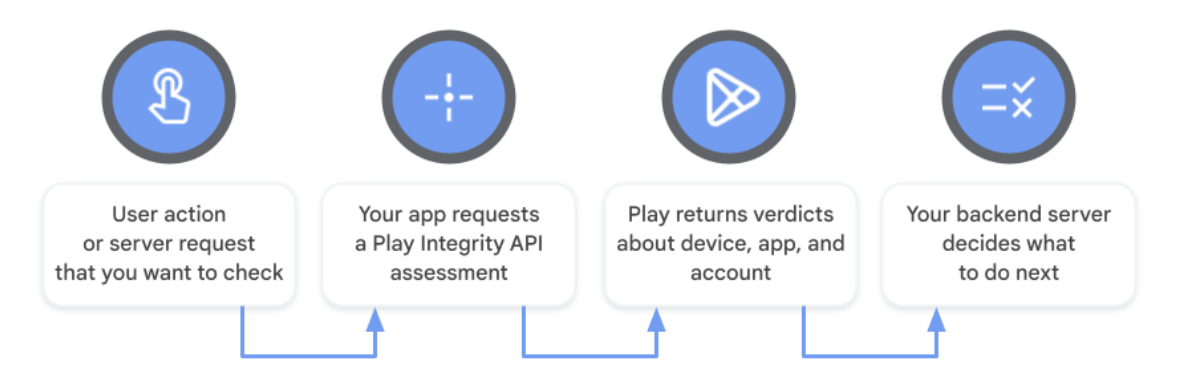
That is the general idea behind a word like "denied". A server asked for proof, didn't get a passing answer, and declined to continue.
How Google describes a trusted Android device
Google's documentation splits the check into three areas:
- App integrity: whether the app is the unmodified binary that Google Play recognizes.
- Account details: whether the user installed or paid for the app on Google Play.
- Device integrity: whether the app is running on a genuine certified Android device.
The device part has a clear passing description. The app is running on a genuine and certified Android device, and on Android 13 and higher there is hardware-backed proof that the bootloader is locked and the loaded system is a certified manufacturer image.
A stricter level exists as well. On Android 13 and higher, it requires security updates in the last year for all partitions of the device.
What makes an Android device fail Google's integrity check
Google's page on integrity verdicts lists the failing cases. An empty device verdict means the app is running on a device with signs of attack or system compromise, such as being rooted.
It also covers an app that is not running on a physical device, such as an emulator that does not pass Google Play integrity checks.
The app can fail by itself too. Google's label for an unrecognized version means the certificate or package name does not match Google Play records.
An unlicensed result happens when, for example, the user sideloads the app or doesn't get it from Google Play.
X has not confirmed that its app relies on this check. If it does, the ordinary candidates are an uncertified or out-of-date system, or an app that didn't come from the official store.
How Apple's DeviceCheck and App Attest work on iPhone
Apple has a parallel set of services. Its DeviceCheck framework is described as a way to reduce fraudulent use of services by managing device state and asserting app integrity.
App Attest is the part about the app. Apple's page on establishing an app's integrity explains the risk: someone who modifies an app and distributes it outside the App Store can add unauthorized features.
The service gives an app a way to assert its validity, so a server can more confidently provide access to sensitive resources.
Mechanically, the app generates a special cryptographic key on the device and has Apple attest to the validity of that key. The private key is stored in the Secure Enclave.
Apple says App Attest has limits
Apple doesn't oversell it. No single policy can eliminate all fraud, it says, and App Attest can't definitively pinpoint a device with a compromised operating system.
Not every device can use it either. Apple's notes on preparing to use the App Attest service say an app that doesn't pass the compatibility check should gracefully bypass the service.
There's a third point that matters for timing. Apple's servers might throttle attestation traffic from a particular app if too many instances make the call simultaneously, for instance right after an app update.
So on an iPhone, a failure doesn't have to mean anything is wrong with your phone. Trying again later is a reasonable first response.
How to fix the attestation denied error on X
Since X gives no fix for this error, these steps combine X's general app guidance with Google's certification check. Six steps cover it, in three phases.
Get into your account first
- Open a browser and sign in at x.com. X's own fallback for a failing app is to visit x.com in your browser.
- Confirm the account works there, so you know the problem is the app or the device.
Update the device and the app
- Update your device's system software to the latest version it offers.
- Install the latest X app from the official store, then try to sign in again.
Check certification on Android
- Open the Play Store app, tap your profile icon, select "Settings", then tap "About".
- Read the Play Protect certification status. If it says "Device is not certified", follow Google's steps for that message.
The order protects you. You have access through the browser before you change anything on the phone.
What Google's certification check on Android tells you
Google's help page on Play Protect certification gives the route used in step five and names the failure message: "Device is not certified".
If you see it, Google says to check its list of certified devices. If your device is on that list, tap "Fix device issue".
Google is direct about the stakes. Apps and features on devices without Play Protect certification may not work correctly.
It also points to updates. System updates, like Android OS and security updates, often fix device issues, and while this isn't a guaranteed fix, Google says it's likely to help.
The X app's minimum version on Android
X publishes a support floor, in wording that is its own. The X for Android app is available for phones running Android 7.93.4 and above, and X no longer supports older versions.
Below that floor, X says, the app may also stop working as expected.
Its remedy matches the steps above. Update your Android device OS and download the latest version in the store, or visit x.com in your browser.
On the install source, X says to open the Google Play app or another app store that features the X for Android app.
X's troubleshooting order for the Android app
X's page on the Android app doesn't mention attestation, but it sets out a general order for an app that won't work:
- restart the device
- check the network connection
- clear the app's data in the device settings
- log out and log back in
- uninstall and reinstall the app
These are worth running once. They clear the ordinary causes, so you aren't blaming attestation for a stale install.
They aren't a documented cure for this error. If the message returns after a clean reinstall from the official store, the browser remains your way in.
Date and time settings can break sign-in on X
One documented cause of app sign-in failure is easy to check. X's page on logging in says the message "Unauthorized or Invalid username and Password" is likely caused by incorrect time zone settings or an outdated version of the app.
The fix is in the device settings. Under "Date & Time", choose "Set Automatically".
That is a different message from attestation denied, and X doesn't link the two.
It takes seconds to rule out, so do it before the longer steps.
What X requires on iPhone and iPad
X's page on the iOS app states a floor here as well. The X for iOS app is available for devices running iOS 14.0 and above.
An older system has a knock-on effect. If your device is still using iOS 13.7 or lower, X says, your X app may not update to more recent versions.
So on an iPhone, the first check is the system version, and the second is whether the app itself is current.
Does a VPN cause the attestation denied error on X?
X doesn't say so. No page connects a VPN to this message.
What X does offer is general. If you're connected to a VPN, try turning it off, and if that fixes your connectivity issue, contact your VPN provider for help.
It's a harmless test. Turn the VPN off, try the app once, and note the result.
Before you reinstall the X app, save two things
Reinstalling has side effects that X warns about. If you use two-factor authentication, be sure to store a backup code before uninstalling the app.
Drafts are the other loss. Logging out of your account will clear your drafts.
A preloaded app adds a wrinkle. X says it may not be possible to remove the app completely, and that uninstalling will uninstall the latest update.
Using X in a browser while the app is blocked
The browser isn't a second-rate option. It's the route X names whenever an app fails.
If the site itself misbehaves, X's page on x.com issues lists the usual fixes. Try a private window, update the browser, clear its cache and cookies, and turn add-ons or ad-blockers off one at a time.
You can keep using X this way for as long as the app refuses you.
What X, Google and Apple don't recommend for this error
Some advice online goes further than any owner page. Switching off developer options is a common tip, and neither X nor Google documents it.
Turning off Google Play Protect is another. Google says device certification is separate from Play Protect.
This article doesn't cover ways to hide a modified system from an integrity check. If your device runs modified software, the documented path is the browser.
A checklist for the attestation denied error on X
Work through it in order:
- Sign in at x.com in a browser.
- Set date and time to automatic.
- Update the system and install the latest X app from the official store.
- Check Play Protect certification on Android.
- Store a backup code, then reinstall the app once.
If the app still refuses and you can't get in by browser either, X's support sign-in form is the last resort.
For now, open x.com and confirm your account is fine.
Attestation error FAQ
Does X say which attestation service its app uses?
No. X publishes nothing on the subject, and neither Google's nor Apple's documentation says X uses its service.
Will turning off Google Play Protect fix a certification problem?
No. Google says turning off Google Play Protect will not fix a "Device is not certified" issue.
Is the attestation denied message a penalty on your X account?
X doesn't describe it as one. It isn't listed among X's locks, limits or suspensions, and X documents no such error at all.