
Twitter impression meaning: a count of displays, not people
What is a Twitter impression? Each time a post shows on a logged-in X user's screen, repeat visits included. Embeds elsewhere don't count.


A common definition of a Twitter impression says it counts every place your post appears, websites that embed it included.
X's help center says embedded posts don't add to the count at all.
What is a Twitter impression?
A Twitter impression is a single time your post appeared on screen for a logged-in X user, anywhere on X from the Home timeline to a profile page, and one reader can produce several. X totals them in the view count under the post, so it measures how many times a post was shown, not how many people saw it.
The sections below cover what X leaves out of that count, when a post collects its impressions, and the stricter kind X pays creators for.
Which views X counts toward a Twitter impression, and which it ignores
When a logged-in person sees a post, anywhere on X, that view goes into the post's count.
X's developer documentation on metrics makes the repeat rule explicit: "the same user viewing twice counts as two impressions."
The view counts page in X's help center spells out who adds to the total and what stays out:
| Who or what | Adds to the view count? |
|---|---|
| People who follow you, and people who don't | Yes |
| Viewers in the Home timeline, in search and on profiles | Yes |
| You, when you look at your own post | Yes |
| The same reader again, on another device | Yes, as another view |
| Posts embedded on other websites | No, they "will not add to view counts" |
| Anyone browsing while logged out | No, X's definition of a viewer starts with "anyone who is logged into X" |
| Older posts | No, they carry no view count at all |
What the number under a post adds up to
You'll see the total twice over: in the row of icons under a post, next to the bar-chart symbol, and again beside the timestamp once you tap into the post.
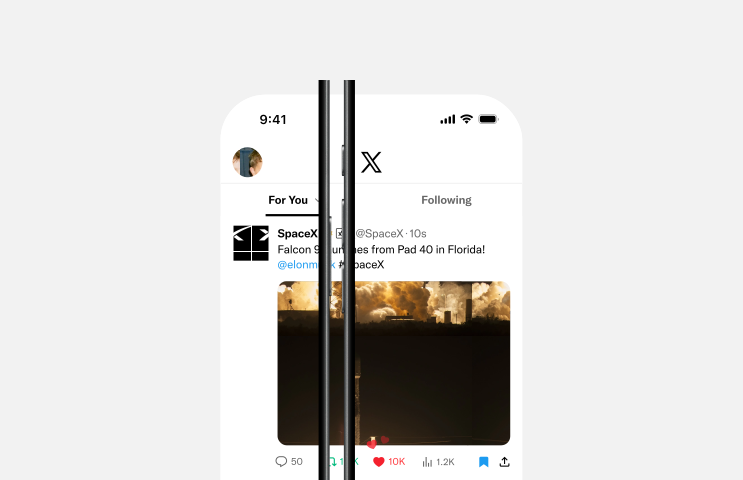
In X's own mockup, the 1.2K beside that icon on the SpaceX post is its view count.
Say 400 people see a post and 50 of them come back to it once more on another device. The view count reads 450, while the number of people who saw it is still 400.
Because your own views and repeat views count, a view count measures exposure, not an audience.
Why definitions of Twitter impressions don't agree
Definitions differ mainly because X has described impressions in more than one way.
X's retired activity-dashboard help page defined them as the times "a user is served a post in timeline or search results."
X's current view-count page is broader about placement and stricter about the viewer. It names Home, search and profiles, counts the author's own views and requires the viewer to be logged in, and it rules out embeds in writing.
The old dashboards also added impressions up over a period. X's published example of the Tweet activity page, set to the last 28 days, reads "Your Tweets earned 30.9K impressions over this 28 day period," above a bar chart of daily totals.

The same screen shows how engagement rate works. Its top post earned 104 engagements on 3,356 impressions, and 104 divided by 3,356 is the 3.1% printed beside them.
Twitter's older analytics home also printed people reached beside impressions, which kept the two ideas apart.
A post today shows only its views, so the number of different people behind your Twitter impressions isn't something you can read off it.
When a post on X collects its impressions
A post can only be recommended in X's For You feed during its first 48 hours, because X's ranking code drops older posts before it scores anything.
After that, new Twitter impressions come from outside For You, such as your profile and search results.
X's open-sourced ranking code also filters out two kinds of repeat: posts a viewer "has already been shown" and posts "already served earlier in the session," meaning earlier in the same visit. For You is designed not to put the same post in front of the same person twice.
Repeat views still reach the count, and the one X gives as an example is a person looking at a post on a computer and then on a phone.
Two more rules in that code involve impressions.
Posts from accounts the viewer doesn't follow take a discount, a multiplier below 1. Posts "from authors whose impressions are below a threshold are lifted toward a target position," a rule the code's documentation calls the New-Author Boost.
Read each post's impressions at the same age, such as two days after posting, so a fresh post isn't judged against one that has finished its For You run.
I'd hold off judging any post until that two-day mark, however slow its first hour looks.
Does a high impression count mean X is pushing your post?
Partly. A count far above your follower total usually means people who don't follow you saw the post, since X counts their views as well.
It can't tell you why they saw it, or whether they cared.
For You scores every post separately for every viewer. X's ranking model predicts how likely that person is to act on the post, then combines those odds into one score:
- Engagement: a like, reply, repost, quote or share.
- Clicks on the post, the author's profile, a link or media.
- Attention, such as how long the viewer stays on the post.
- Following the author.
- Negative signals: Not interested, a mute, a block or a report.
A post that keeps reaching people who don't follow you is clearing the out-of-network discount on the strength of those predictions.
That's why engagement per impression says more about a post's pull than the raw count does.
The impressions X pays creators for are stricter than views
X's creator payouts don't use the view count. Its Original Content Rewards program pays on qualified impressions instead.
X defines those as "unique impressions from Premium users" on the Home timeline "where at least 50% of the post is visible."
Measured that way, several things the view count keeps drop out:
- Repeat impressions from the same account on one post.
- Paid, promoted or artificially generated impressions.
- Views from people without a Premium subscription.
- Views outside the Home timeline, such as in search or on a profile.
To join the program, an account needs, among other requirements:
- An active Premium, Premium+ or Premium Business subscription.
- At least 500 verified followers.
- At least 500,000 Home timeline impressions from verified users in the last 90 days, not counting impressions on replies.
Payouts run every two weeks, with a $30 minimum.
The program took over from Creator Revenue Sharing, which asked for 5 million organic impressions in 3 months, so advice built around that figure is out of date.
Even if you never apply, the rules show how X itself separates exposure that matters from exposure that doesn't. One account counts once, and a glimpse of less than half the post doesn't count at all.
Where to read your impressions on X
Two places show a post's impressions to anyone, and a third holds your account's totals:
- Under the post itself, beside the bar-chart symbol, wherever it appears in a feed or on a profile.
- On the post's own page, next to its date and time.
- In account analytics, reached through Creator Studio in X's side menu.
Account analytics is where X adds up your impressions on X across every post; the count under a post only ever covers that post.
X's @XCreators announcement presented Creator Studio as the place for monetization, analytics and support.
The account-level page launched as a Premium perk, and the @premium announcement promised daily insights into how your posts are performing to anyone who upgraded.
Why your impressions on X can fall
Several causes of a lower count are written into X's ranking code. Each of these shrinks a post's For You reach, and with it the impressions the post collects:
- Negative feedback. Not interested, a mute, a block, a report and scrolling past without stopping all count against a post in the model's predictions.
- Posting in bursts. Each post after an author's first in a viewer's feed is scored down by a decaying factor, so a run of posts in a row competes with itself.
- Age. Past 48 hours, a post leaves the pool For You ranks from.
- Visibility filtering. A separate system can drop a post, or show it behind an interstitial, based on labels attached to posts and accounts.
For the last one, X is piloting a transparency tool called Under the Hood, linked from its algorithm documentation. It shows aggregate statistics about the visibility-limiting labels on your account and posts, and its reports now say whether visibility was limited to comply with a law.
X says it's expanding availability over time, so your account may not have it yet.
When the count falls, check which of these changed before you change what you post.
Read Twitter impressions as displays, or you'll repeat the wrong posts
If you read the view count as a head count, the errors stack up:
- Your own checks and a fan's return visits pad a post's total.
- A two-hour-old post looks weak next to one that has had its full two days.
- You end up repeating whatever happened to be seen most.
Read Twitter impressions as displays instead, set them beside engagements, and compare posts at the same age, and the count starts telling you which posts earned attention.
Start with your next post: note its views and engagements at the two-day mark, and hold every later post to that same clock.
Questions about X view counts and impressions
Why do my video analytics show fewer views than the post itself?
Because the two numbers follow different rules. In Media Studio analytics, X registers a video view only when someone has watched for 2 seconds or more while at least 50% of the player is in view.
The views under the post are its impressions, which X's API lists among the public metrics anyone can see. They rise each time the post is displayed, even if the video never plays.
Can I see how many impressions someone else's post got?
Yes. The view count on a post is public, so you can read it on anyone's post the same way you read it on yours, beside the bar-chart icon or next to the post's date and time.
Can I hide the view count on my X posts?
X's help page doesn't describe a way to hide it, and it says that "anyone on X can see view counts on posts," whether they wrote the post or are reading it.
Why does my new post show no views yet?
Give it a minute. X says it "may take up to a minute after a post is posted for the count to show."
Can followers of a protected account see its view counts?
Yes. X's help page says followers of a protected account can see view counts on its posts, and the author always could.