Twitter algorithm reset: find where the unwanted posts come from first
Reset your Twitter algorithm by unfollowing or muting accounts you follow and marking X's recommendations Not interested. No switch exists.

When For You fills up with posts you'd never pick, the reflex is to hunt for a reset switch. X doesn't have one, and the right fix depends on whether each unwanted post comes from an account you follow or from a recommendation.
There's no reset button on X, so you reset the Twitter algorithm by changing what it learns from: unfollow or mute the accounts you follow that post what you don't want, and tap "Not interested in this post" on recommendations from accounts you don't follow. Then remove stale Topics and interests, and follow and engage with the subjects you want more of.
The sections that follow show how to tell the two kinds of posts apart, the steps for each, what every control changes, and a 24-hour break for paying subscribers.
How to reset the Twitter algorithm, one source at a time
To reset the Twitter algorithm, sort each unwanted post by where it came from and use the control built for that source.
Posts from accounts you follow leave when you unfollow or mute them. Recommended posts fade when you tell X you're not interested and drop the Topics and interests behind them.
The nine steps below cover both sources, then rebuild the feed with better signals.
Check whether you follow the account first
X labels many recommended posts with the reason they reached you. Its recommendations help says it adds context such as "the name of the Topic, or who in your network follows or has Reposted the post author."
A line that names someone you follow tells you the post reached you through that person, so their account is part of the source too.
No label and still unsure? Open the profile and check whether you follow the account.
That one check decides which of the next two groups of steps applies.
Say your feed has turned into football takes. Three posts arrive with a football Topic as their context line, so they're recommendations. Two more come from a friend who posts through every match, so they're from an account you follow.
The first three call for Not interested and an unfollowed Topic; the friend calls for a mute, not an unfollow.
Clear out posts from accounts you follow
- Unfollow the account if you no longer want its posts, from its profile or from the Following list on your own profile. X doesn't send a notification when you unfollow someone.
- Mute it instead if you'd rather keep the connection. Open the more menu on the account's profile, or on any of its posts, and choose Mute. Its posts leave your timeline, and X doesn't tell the account.
Turn down recommended posts from accounts you don't follow
- On the recommended post, open the more menu (the three dots) and pick Not interested in this post.
- When X suggests a Topic in your timeline, tap Not Interested on the suggestion.
- Mute the word or hashtag behind a subject. In the app, open the Notifications tab, tap the gear icon, then Muted and Muted words. Tap Add, type the word, switch on Home timeline and choose how long the mute lasts.
Clear the interests X has on file
- Unfollow Topics you've outgrown from your Topics list. The list is reached from the profile icon menu on mobile and from the more menu on x.com.
- Untick anything that doesn't fit on the Interests from X page, part of Your X data. In the app, that page sits behind a password check: Settings and privacy, then Privacy and safety, Ad preferences, See your X data, and Interests and ads data.
Rebuild the feed around what you want
- Pick a handful of accounts that post regularly about what you do want, follow them, and engage with the posts worth seeing again.
- Follow a List built around one of those subjects. According to X's Lists help, you'll get "recommendations from the Lists you follow right in your For you timeline," and the Discover new Lists prompt in the app can suggest some to start with.
Matching the control to the source is what makes a Twitter algorithm reset stick.
Not interested teaches the ranker about a kind of post, while an unfollow removes an account from the pool of posts X draws from the people you follow, and neither one replaces the other.
Why does X show posts from accounts you don't follow?
Because For You draws on two pools of posts, and only one of them is your follow list. X's open-source For You code gathers in-network posts from the accounts you follow and out-of-network posts from accounts you don't.
Two systems find that second pool. One is a retrieval model that matches posts to you, and the other is SimClusters, which groups accounts into interest communities.
X's 2023 diagram of those communities showed clusters such as news, pop, the NBA and soccer:
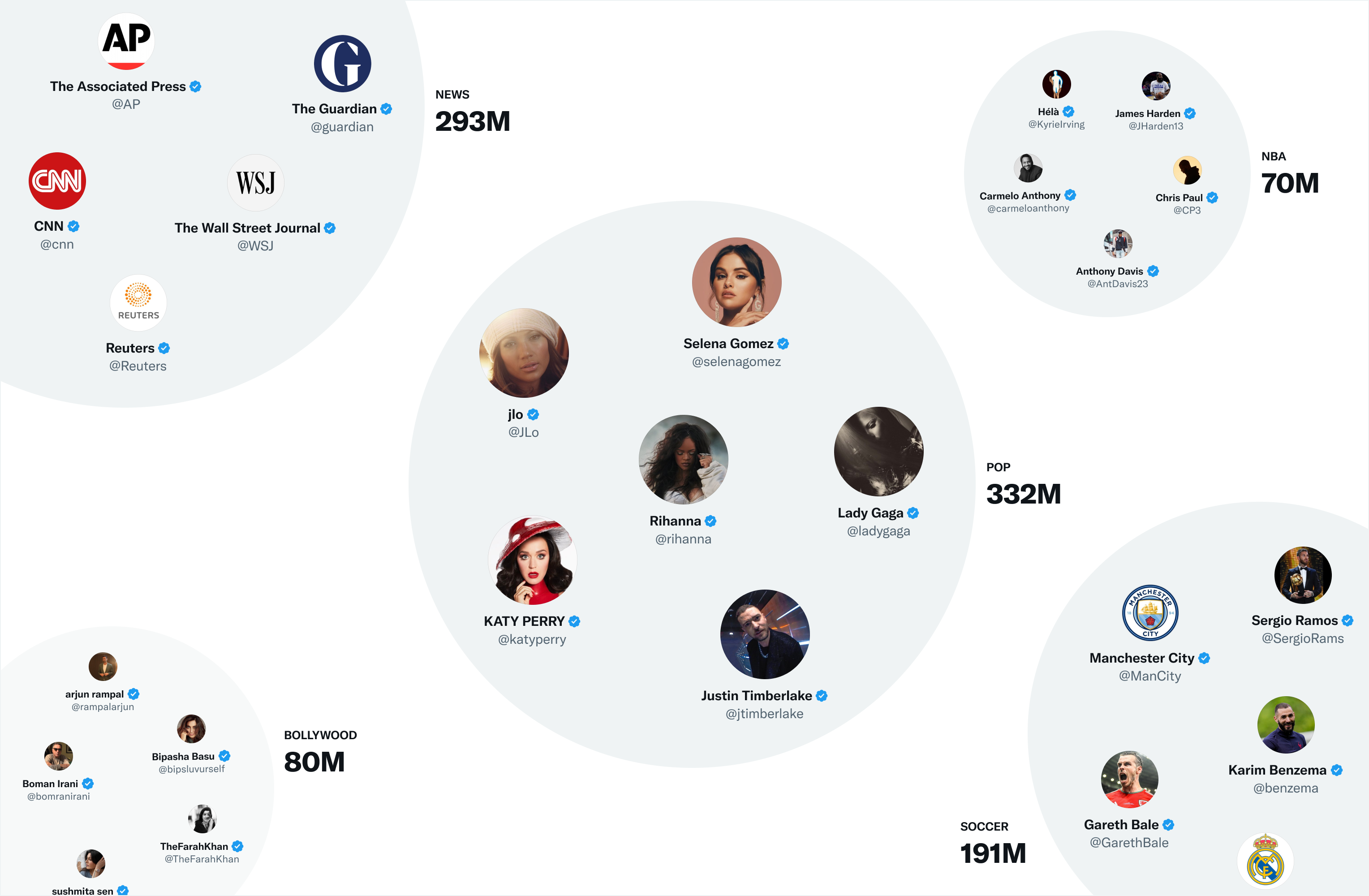
The current code still calls SimClusters to find posts from accounts you don't follow, and it scores those posts lower, multiplying them by a factor below 1.
When one still lands near the top of your feed, the model has predicted you'll engage with it, based on your recent engagement history.
Some unfamiliar posts appear by design
A For You feed with no strangers at all isn't on offer. The same code lifts posts from authors whose impressions are below a threshold toward a target position, so newer and smaller accounts get a turn in front of you.
That's why this pool responds to feedback rather than unfollows: Not interested, muted words, and scrolling past what you don't want to see.
To reset your Twitter algorithm for this pool, the habit matters as much as the menu. X's published code counts opening a post and time spent on it as positive signals, so reading the replies under a post that annoys you still tells the model you're interested.
What each control does to your X feed
Each control X gives you does a different job, and the difference decides how long a change lasts:
| Control | What it changes | How long it lasts |
|---|---|---|
| Unfollow | Removes the account from the pool of posts from people you follow | Until you follow it again |
| Mute an account | Takes its posts out of your timeline without telling the account | Until you unmute it |
| Mute a word | Hides matching posts from Home and from the posts X suggests to you | Forever by default, or 24 hours, 7 days or 30 days |
| Not interested | Signals X to recommend less of that type of post | X doesn't say |
| Block | Stops the account following you or engaging with your posts, and drops its posts from your feed | Until you unblock it |
The table draws on X's help pages on muting accounts and muting words. The blocking row follows its blocking help, and the Not interested row comes from its recommendations help.
Mutes and blocks work as filters, and X's code removes those posts before it ranks anything. Not interested and your engagement work as signals, changing what the ranker learns about you.
Filters are exact but narrow, since a muted word catches that word and not the subject around it. Signals are broad but gradual.
Most feeds need both, and I'd start with the filters, because you can check their effect on your next scroll.
Snoozing a topic for 24 hours on a paid X plan
X Premium subscribers get one more control.
In April 2026, X began rolling out Snooze Topics on iOS and the web for Premium subscribers. TechCrunch's hands-on with X's custom feeds quotes the launch post: "snooze topics on your For You tab."
The screenshot X's head of product posted with the launch shows a Snooze Topics sheet on the For You tab. It carries toggles for subjects such as Politics, Sports and Business & Finance, the line "Select topics to hide for 24 hours," and a Reset button:
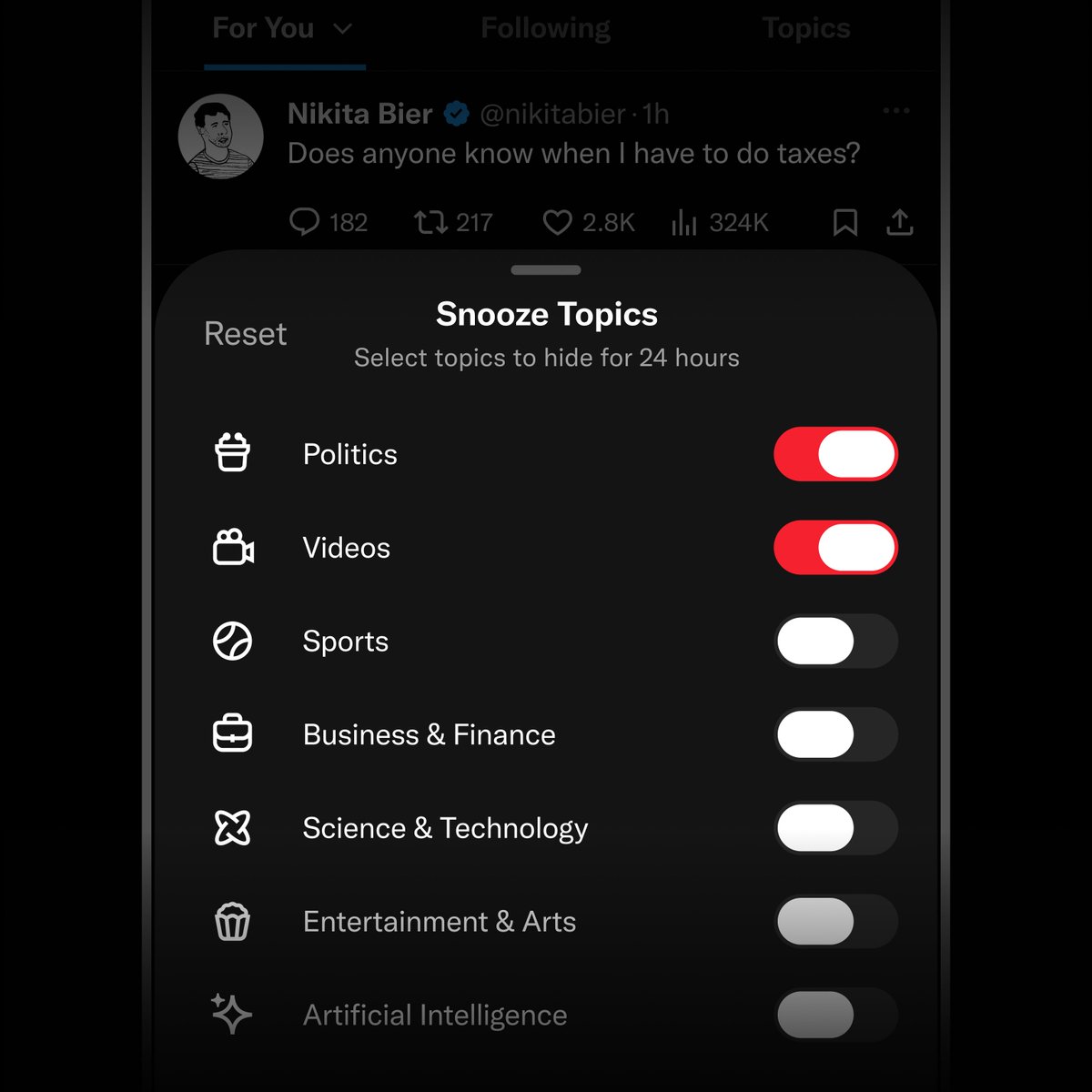
A snooze runs out on its own, so it won't reset the Twitter algorithm. It suits a news cycle or a tournament you want to sit out, while the steps above are the lasting change.
How to tell your X feed reset is working
Watch where your posts come from, not only what they're about. Over the next few days of scrolling, look for these signs:
- Fewer recommended posts carry context lines for Topics you dropped.
- Accounts you muted or unfollowed no longer appear.
- Posts from your new follows show up in For You.
- Timed word mutes are still active, since they end on their own.
A Twitter algorithm reset shows up in the sources first and the subjects second.
X doesn't publish a timeline for any of this. Its Topics help warns that interest changes "can take some time to take effect across our systems," without giving a number.
The same page says you may still see a subject when someone you follow keeps posting about it. If one subject keeps coming back, look at your own Following list. The account behind it may be one you followed years ago.
Recheck that list regularly, because follows pile up quietly and each one keeps feeding the pool.
You can start resetting your feed with the next post you see
You don't need a new account, a paid plan or a free afternoon to reset your Twitter algorithm. The next ten unwanted posts you meet are enough: check whether you follow each account, then unfollow, mute or tap Not interested.
Unfollows and mutes can be undone at any time, so there's little risk in starting with the obvious ones.
New to the subjects you want? The best-known voices in your industry on X give you accounts to start with.
Start with the next post you'd rather not see.
Search history, muting and ads: Twitter feed reset questions
Will wiping my search history or cache give me a fresh feed on X?
No. For You is built from what X keeps with your account: your follows, mutes and recent engagement.
Its published code doesn't name a device cache or search history among its inputs. X's personalization settings also follow your account to any device you sign in on.
Does muting a conversation change what shows in my feed?
No. X's muting help says a muted conversation stops sending you notifications, but its posts still appear in your timeline. To keep a thread's posts out of the feed, mute the account or tap Not interested.
Why do I still see ads after resetting my feed?
Ads sit outside the ranking you've been retraining. Promoted posts are a documented part of the timeline in X's timeline help, and X's code slots ads, account suggestions and prompts in after the ranked posts are chosen.
Will people know if I mute or unfollow them?
No. X says muted accounts won't know you muted them, and it doesn't send a notification when you unfollow someone.