
The Twitter character limit: how many characters a post on X can hold
What's the Twitter character limit? 280 characters a post, 25,000 with any X Premium plan, and 140 in Chinese, Japanese or Korean.


How many characters fit in one post on X? The answer is a single number, but links, emoji and the language you write in decide how far that number stretches.
The Twitter character limit is 280 characters per post, and any X Premium plan raises it to 25,000.Letters, numbers, spaces and most punctuation cost 1 character each.A link costs 23 characters, whatever the length of the address.An emoji, or a Chinese, Japanese or Korean character, costs 2.
The sections below cost out a typical post, explain why three languages stay at 140, and show the free way to publish a draft that runs longer.
What counts toward the Twitter character limit
Every character you type draws on the same Twitter character limit of 280, but X doesn't price them all the same. X's developer page on counting characters sets these costs:
- Letters, digits and ordinary punctuation: 1 each.
- Any link: 23, because X shortens every URL with its t.co service.
- Each emoji: 2, even with a skin tone or several emoji joined into one.
- Each Chinese, Japanese or Korean character: 2.
- Photos, GIFs and videos you attach: 0.
The same 280 covers replies and quote posts. Replies get one allowance: the @usernames X fills in when you reply are free, though any @username you type yourself is charged like other text. Hashtags get none, so a tag counts in full, # included.
A few common symbols cost 2 as well. The weight file linked from that developer page charges 1 for a hyphen, a dollar sign or a curly quote, but 2 for the • bullet, the € sign and the → arrow.
If you build lists inside your posts, hyphens are the cheaper bullet.
Attachments are the free part of a post. The composer in the mockup from X's business guide below holds a short announcement, a money.x.com link and a 27-second video.
The link costs the full 23 even though its address is shorter, and the video costs nothing.

A sample post on X, costed character by character
A typical promo post carrying one link, a pair of emoji and a single hashtag spends its 280 like this:
- The link to your page: 23.
- Two emoji: 4.
- The hashtag #SpringSale: 11.
- Three spaces to separate them: 3.
- Left for your own words: 239.
At five or six characters a word, counting the space after each, 239 characters comes to roughly 40 to 48 words of English. Drop the link and the emoji, and you win back 27 characters, about five more words.
Budget the link and the emoji first, then write to what's left.
Which languages get only 140 characters on Twitter
Chinese, Japanese and Korean posts top out at 140 characters, because each of those characters costs 2 against the 280.
Add a link and a Japanese post has room for 128 characters: 280, minus 23 for the link and 1 for the space, divided by two.
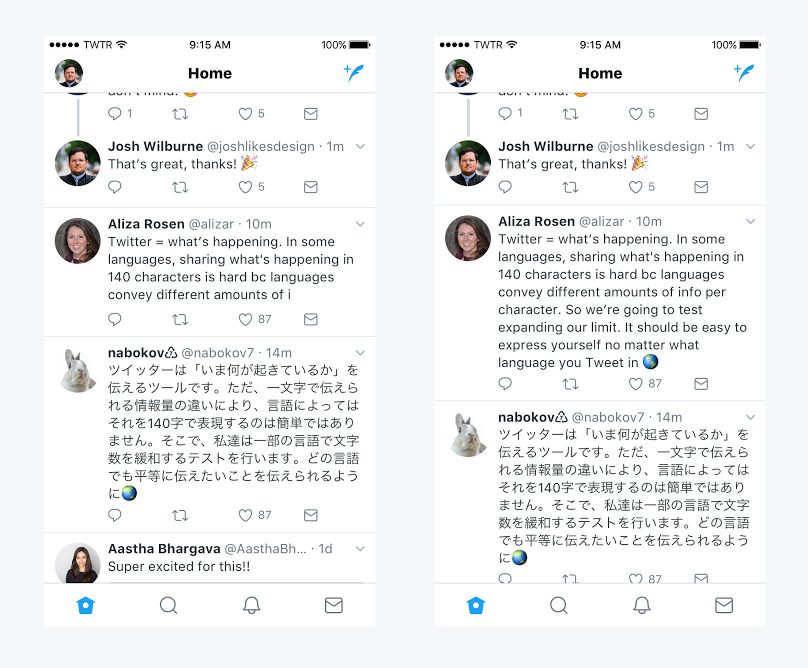
The split goes back to 2017. When Twitter announced its test of a 280-character limit that September, it said those three languages carry about twice as much information per character as English, Spanish, Portuguese or French. People writing in them rarely ran out of room.
By November, Twitter rolled out 280 characters to every language where cramming had been a problem and kept Japanese, Korean and Chinese at 140.
It also shared what the test showed: the share of English posts that hit the limit fell from 9% to 1%, and only 5% of posts ran past 140 characters. People given the extra room also received more likes, retweets and mentions and gained more followers, the company reported.
The September announcement showed the gap side by side: the same English post cut off at 140 characters and complete at 280, while its Japanese version fits in either.
Scripts that still count as one character on X
The double weight doesn't halve every non-Latin script. The weight file behind X's counting rules charges 1 for Greek, Cyrillic, Hebrew, Arabic, Thai and Devanagari characters, so Russian, Arabic and Hindi writers keep the full 280.
With a link added, a Russian post still has 256 characters for its words.
What X Premium changes about the Twitter character limit
Any X Premium plan lifts the limit to 25,000 characters per post, and that includes Basic, the cheapest tier. X's help center page on X Premium puts longer posts on the feature list for every tier and prices Basic from $3 a month on the web.
Businesses get no bigger allowance: the same page says Premium Business and Premium Organizations accounts, and their affiliates, come with Premium+ included, so their long posts also stop at 25,000.
Long posts can be quotes or replies too, and subscribers can set words in bold or italics. Everyone can read a long post; only subscribers can publish one.
Older guides often quote 4,000 instead. That was the cap when Twitter Blue introduced long tweets in February 2023, according to TechCrunch's report on 4,000-character tweets.
X's Premium page now lists 25,000.
One rule doesn't stretch with the limit. X's page on the types of posts says an account you mention after the first 280 characters of a long post currently gets no notification, so tags belong near the top.
How X's composer shows the characters you have left
X's composer keeps the count for you in a small circle icon, which tracks your progress around its outline as a draft grows toward the 280-character limit.
Run past the limit and X highlights the extra text, so you can see exactly what to cut or move into a second post.
The count already applies X's rules. On the web, X's help page on posting links says a pasted URL of any length is counted as 23 and the counter reflects it, so a long link moves the number by 23, not by its full length.
On a Premium plan, the circle changes at 280. X's posting instructions say it switches from tracing your progress around its outline to filling in, because the draft can keep going to 25,000.
Thread, long post or image: which format fits a long message on X?
Once a message outgrows the character limit on X, you have three ways to publish it, and each changes how people read it:
- A thread is free, and each post in it stays a normal post that people can like, reply to or share on its own.
- A long post needs Premium and reads as one continuous piece, with bold and italics available.
- A screenshot of your text costs no characters, but a link inside it can't be tapped, and screen-reader users get none of the words unless you write an image description, which X allows up to 1,000 characters long.
Pick the thread when the message breaks into steps or points someone might answer one by one. Pick the long post when it's a single argument that loses force when cut, and keep the screenshot for text that has to keep its layout, with the description filled in.
How to post more than 280 characters on Twitter without Premium
Without Premium, a long draft goes out as a thread: a chain of connected posts from your account, each with its own 280-character limit. X builds threads into the composer, and its steps for creating a thread match on the web and in the app:
- Open the composer with the compose icon in the app, or the Post button on the web, and write your first post.
- Select the plus icon to start the next post. It lights up once the post above has text.
- Move any highlighted text down into the next post. X highlights whatever runs past the limit.
- Select Post all once every post fits.
Writing each post as a finished thought before adding the next pays off in the timeline. X shows two or three posts of a thread joined by a line, but trims threads of four or more behind a Show this thread link, so the opening post has to make readers want the rest.
After it's live, the Add another post option on the thread lets you extend it, and only you can see it. In the app, you can also save an unfinished thread as a draft and come back to it.
Each post in a thread gets its own budget, so a link repeated in every post costs 23 characters every time.
Put it once, in the post where readers need it.
Sizing your next Twitter post before it goes out
Before your next post goes out, give it a ten-second budget check against the Twitter character limit. Count 23 for each link, 2 for each emoji and each Chinese, Japanese or Korean character, and 1 for nearly everything else you type.
Doing that first tells you whether a draft needs a trim, a thread or nothing at all.
If long posts turn into a weekly habit over the next few months, that's the point where the Basic plan's 25,000 characters earns its price.
Until then, the thread is free and already in your composer, and X's own 2017 test found that most posts never came close to 280.
Questions about line breaks, scheduling and formatting long posts on X
Do line breaks count toward the Twitter character limit?
Yes, each line break costs one character, the same as a space. The weight file behind X's counting puts line breaks in the 1-character range with letters, so a post set out in five short lines spends four characters on the breaks between them.
Can you schedule a post longer than 280 characters?
Not on the web for now. X's page on the types of posts says the web doesn't currently let you save a longer post as a draft or schedule it, and its Premium how-to page says longer posts can't be scheduled yet.
Posts of 280 characters or fewer can be: the calendar icon in the web composer sets the date and time.
Why does another app show a different character count?
Because not every app applies X's link rule while you type. X's help page on posting links says some apps adjust the count as you compose and some don't, while X itself charges 23 characters for every link.
Check a long draft in X's own composer before you post it.
Can a long post on X have headings and bullet lists?
Not as formatting. Long posts support bold and italics, while headings, subheadings and bulleted or numbered lists belong to X's Articles format, which X limits to Premium, Premium+, Premium Business and Premium Organizations subscribers.
You can still type hyphens as plain-text bullets in any post.