Mute words on Twitter: settings for spoilers, pile-ons and topics you're tired of
Spoilers or pile-ons on X? Mute words on Twitter in Mute and block to hide them from your timeline, alerts or both, 24 hours to forever.

One topic can take over X for days, whether it's a finale you haven't watched yet or a pile-on that keeps your phone buzzing. X's muted words filter handles both, but pick the wrong settings and the posts keep coming.
To mute words on Twitter, add each one to X's Muted words list: on x.com it sits under Settings and privacy > Privacy and safety > Mute and block > Muted words, and in the X app you open it from the Notifications tab's gear icon. Every entry can hide matching posts from your Home timeline, your notifications or both, for 24 hours, 7 days or 30 days, or with no end date. Search is the exception: X still shows those posts when you look them up.
After the steps, you'll find the right settings for a spoiler, a pile-on or a topic you're done with, plus X's controls for accounts, threads and whole topics.
How to mute words on Twitter from the app or x.com
Every muted word is its own entry with its own settings, so one list can hold a permanent mute and a one-day mute side by side.
X's help page on advanced muting options documents three ways into that list, one each for x.com, iPhone and Android.
Getting to muted words on each device
Use the route for the device in your hand:
- On x.com: open More, pick Settings and privacy, go to the Privacy and safety tab, then choose Mute and block and Muted words.
- In the iPhone app: the gear icon on your Notifications tab, then Muted, then Muted words.
- In the Android app: the gear icon on your Notifications tab, then Muted words.
Adding a word and choosing what it covers
- Start a new entry (Add on iPhone, the plus icon on Android and x.com) and enter a single word, phrase, emoji, hashtag or @username.
- Choose Home timeline, Notifications, or both. Home timeline filters your feed, while Notifications filters replies, mentions and the alerts X sends you.
- Set who the notification mute applies to: From anyone, or From people you don't follow. Your timeline ignores this choice.
- Pick how long the mute lasts, then save. The choices are Forever, 24 hours, 7 days and 30 days, and X starts every new entry at Forever.
In the apps, each saved entry shows its mute period beside it, so the list itself tells you which mutes are permanent and which will lift.
Keeping the settings per entry is what makes the list flexible. A word you never want to see and a match you'll watch tomorrow can sit next to each other under different rules.
The X mute settings for spoilers, pile-ons, old topics and people
The same four choices solve very different problems, depending on what you're trying to shut out.
A spoiler or live event you'll catch up on later
Mute the title and the names people will post about, and tick both Home timeline and Notifications. Set 24 hours or 7 days so the mute lifts on its own once you've caught up.
X mutes a single word's hashtag along with it, so "#finale" needs no entry of its own once "finale" is muted.
That rule is written for single words, though. A multi-word title's hashtag has to run the words together, since hashtags can't hold spaces, so add that hashtag as a separate entry to be safe.
A topic you never want to see again
Choose Forever and tick Home timeline, plus Notifications if the topic also turns up in your replies.
Capital letters don't matter to the filter, but X lists no matching for nicknames, initials or misspellings, so a show people shorten to its initials needs the full title and the initials as separate entries.
A permanent mute reaches past your feed, too. According to X's help page, anything it recommends to you, whether on X itself or in an email, leaves out content carrying your muted words and hashtags.
Search is the one door it leaves open: look the word up, and the matching posts are all still there.
A pile-on in your replies and mentions
Tick Notifications and choose From people you don't follow. Strangers' posts with the word stop reaching your alerts, while friends who use it still get through.
X's help says notification mutes apply to replies and mentions, including the likes, reposts, further replies and quote posts that follow from them. The mute covers push, SMS and email notifications as well as the Notifications tab.
Everything about one person
A person can reach your feed three ways, and each takes a different mute:
- Their name as a muted word hides posts about them, whoever writes them.
- Their handle with its @ sign hides posts that mention their account.
- Muting the account itself hides what they post.
The middle one catches people out. An @username entry only filters mentions of that person; X is clear that it won't mute the account, so their own posts keep arriving until you mute them from their profile.
How to unmute a word on X or change its timer
Changing or removing a mute happens in the same Muted words list. Select the entry, then:
- In the iPhone or Android app, change where it mutes from or its timing and tap Save, or tap Delete word and confirm to unmute it.
- On x.com, change the same options and click Save; to unmute instead, click the muted button.
A timed mute also ends by itself. Once its 24 hours, 7 days or 30 days are up, posts with the word start showing again without you doing anything.
Quieting X notifications from strangers
A muted word judges a post by its text. X's notification filters judge the sender instead, which suits a pile-on from accounts you've never seen before.
X's page on the Notifications timeline lists them beside muted words in your notification settings. Those open from the gear icon in the app, or from Settings on the Notifications page of x.com.
The Quality filter hides lower-quality notifications, such as duplicate posts or content that looks automated. X says it never filters people you follow or accounts you've recently interacted with, and it's switched on by default for people new to X or reinstalling the app.
Advanced filters go by account type. You can switch off notifications from:
- new accounts
- accounts that don't follow you
- accounts you don't follow
- accounts with a default profile photo
- accounts without a confirmed email address or phone number
Each of these filters only catches accounts you don't follow, so notifications from people you follow always get through.
To turn them on, open Notifications, go into its settings, choose Advanced filters and switch on the ones you want.
X may also add a notification inviting you to adjust the filters if your account suddenly gets a lot of attention.
Muting a word, an account or a conversation on Twitter
A muted word catches content no matter who posts it. When the problem is one person or one thread, X has narrower controls.
Muting one account
Muting an account takes its posts off your Home timeline without ending your follow, and X's page on muting accounts says it gets no notice of the mute. It can still follow you and send you messages.
You'll keep seeing a muted account's replies and mentions in Notifications if you follow it, and stop seeing them if you don't.
The Mute option sits in the more menu, both on the account's profile and at the top of each of its posts.
Muted accounts get a list of their own, separate from muted words. On x.com, the path is Settings and privacy, then Privacy and safety, then Mute and block, where Muted accounts sits next to Muted words. In the apps, open Settings and privacy from the menu, then Privacy and safety, and find it under Safety.
To undo a single mute, tap the unmute icon at the top of the account's profile, or use the more icon there on x.com.
Muting one thread, or blocking an account
Muting a conversation only affects notifications. X stops alerting you about new activity in that thread, though its posts still show in your timeline and when you open the original post.
Open any post in the thread, tap the more icon and choose Mute this conversation.
Blocking is the step up when you want an account unable to reach you. X's blocking page lists what a blocked account loses:
- following you
- sending you a Direct Message
- liking, replying to or reposting your posts
If your posts are public, a blocked account can still read them. A block is also visible: the account finds out the next time it opens your profile, while a mute stays hidden.
Muting words versus snoozing whole topics on X
Snooze Topics, a newer tool for Premium subscribers, hides whole subjects instead of single words. X's head of product posted the Snooze Topics announcement, describing a tool to snooze topics on your For You tab and rolling it out on iOS and the web.
In the screenshot attached to that post, a sheet slides up over For You and reads "Select topics to hide for 24 hours", above a switch for each category, with Politics, Videos and Sports among them.
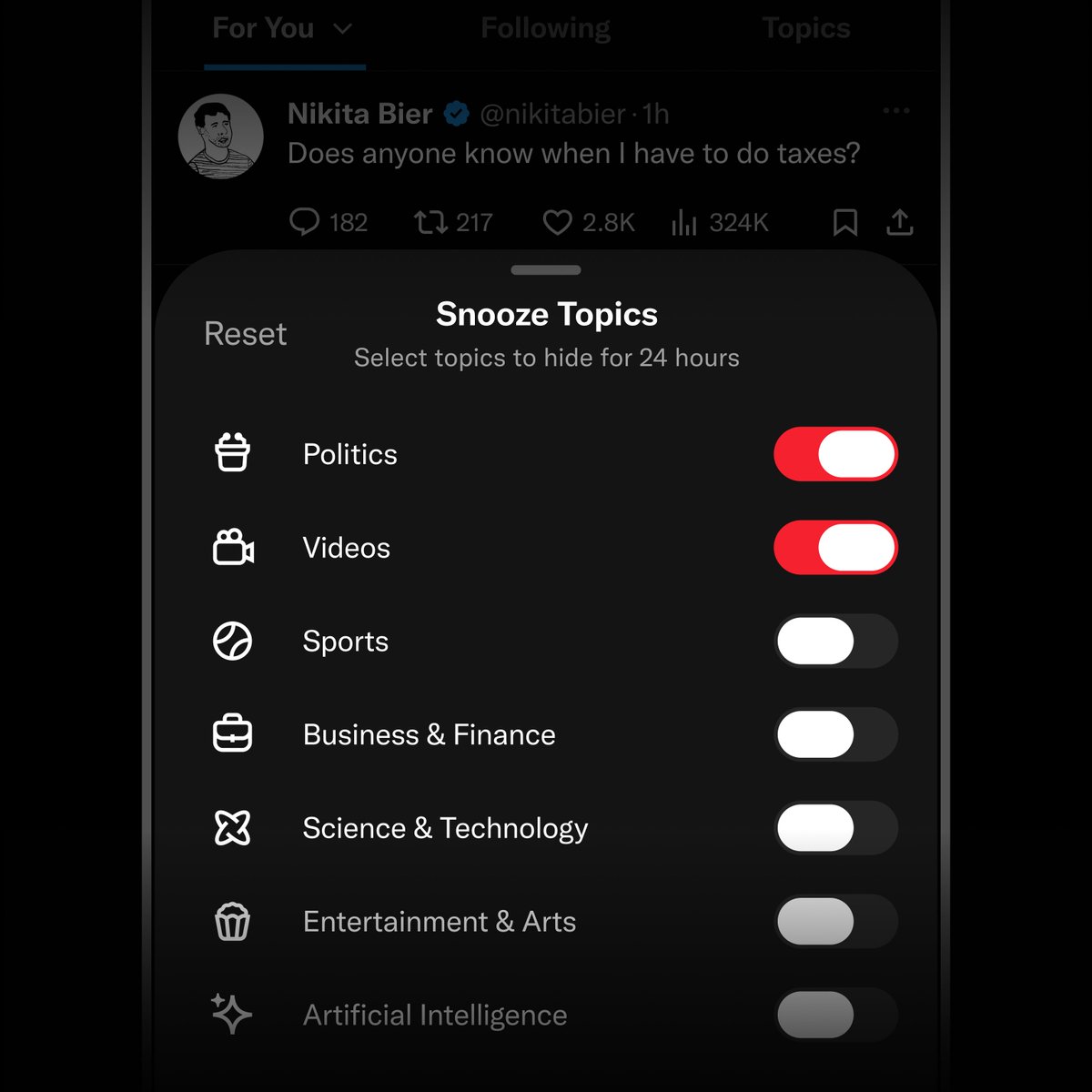

The two tools split the job. Muted words work on every account, match the specific words you give them, cover your Home timeline and notifications, and can run forever.
Snooze Topics needs Premium, works on broad categories, applies to For You, and lasts a day at a time.
A news cycle you want a break from suits a snooze; a spoiler or one person's name suits a muted word.
Because X announced the snooze as a rollout, check that your account has it before you count on it.
You don't need a perfect X mute list to start
Muting is one of the few settings on X you can get wrong at no cost.
A mute can be deleted in a tap or two, a timer can end it for you, and a muted word involves nobody else, so no one is waiting to notice.
Start with the one word bothering you today. Give it seven days, look at your feed when the week is up, and keep, widen or delete the entry from there.
Before you close settings: questions about X's mute filter
Is your muted words list private on X?
Yes. The list lives in your own Mute and block settings, and X's help describes no place where anyone else can view it. Adding a word also sends nothing to the accounts whose posts it hides.
Do muted words filter your direct messages on X?
X's help page doesn't include them. The places it lists are the Notifications tab, push, SMS and email notifications, the Home timeline and replies to posts.
For a noisy message thread, X documents a separate way to mute a Direct Message conversation's notifications.
Can you mute several words at once on X?
Not in X's own settings. Its help page says entries go in one at a time, so a list of five names means adding and saving five separate entries.
Will muting a word stop alerts from accounts I turned notifications on for?
No. If you've asked X to notify you whenever an account you follow posts, those alerts still arrive even when the post contains a word you muted.