How to know if someone blocked you on Twitter: the one check X documents
To know if someone blocked you on Twitter, open their profile: X shows a message alerting you of the block. No notification is ever sent.

To know if someone blocked you on Twitter, visit their profile and read what X shows you.If they blocked you, X shows a message alerting you of the block.You cannot follow them, message them or engage with their posts.X sends no notification, so the profile visit is the only way to find out.
The walkthrough below covers the check, what you can still see, and the situations that look like a block but aren't one.
How to know if someone blocked you on Twitter
The check takes under a minute. Twitter is now X, and X's page about being blocked describes one method: go to the profile.
- Open X in the app or a browser, logged in to your own account.
- Go to the person's profile by searching their handle or opening a link to it.
- Read the message on the profile. If the account has blocked yours, X says you will see a message alerting you of the block.
- Try to follow them if you want a second confirmation, since X says a blocked account may also notice the block when it tries to follow.
That is the whole procedure. If the profile loads normally and the follow option works, you are not blocked.

What the block message on X tells you
X does not publish the exact wording of the message. Its help pages say only that a blocked account that visits the profile "will see they have been blocked".
So don't rely on a quoted sentence from an old screenshot. The text can change, and X's documentation commits only to the fact that a message appears.
What matters is that it is explicit. X contrasts it with mute, which it describes as invisible to muted accounts. A block is something you can see once you look.
Twitter does not notify you when someone blocks you
There is no alert. X's page on blocking says blocked accounts do not receive a notification alerting them that their account has been blocked.
The same page repeats the point from the other side. A blocked account may notice the block if it visits the profile or tries to follow, but it will not receive any notifications.
That is why the profile visit is the only way to know if someone blocked you on Twitter.
Nothing arrives in your notifications, your inbox or your email.
It also means a block can sit unnoticed for a long time, until you happen to visit.
What you can't do toward an X account that blocked you
X lists what a blocked account cannot do. Toward the account that blocked you, you can't:
- engage with their posts, such as like, reply or repost
- follow them
- send them Direct Messages
- add their account to your Lists
- tag them in a photo
X defines the block feature by these effects. It says block helps people restrict specific accounts from following, Direct Messaging and engaging with them.
Each item is also a quiet signal. If a follow or a message to one particular account keeps failing, open their profile and check.
Can you still see someone's posts after they block you on Twitter?
Under X's current behavior, often yes. X's main block page says that if your posts are set to public, accounts you have blocked can see your posts.
It adds the limit straight away. They cannot engage with those posts, so no likes, replies or reposts.
Be aware that X's pages are not fully consistent on this. Some of its other help pages still carry older wording that says a blocked account will not be able to see any posts.
The dedicated block page reflects the current behavior.
So seeing someone's public posts does not mean you aren't blocked, and the message on the profile is the thing to go by.
Why you no longer follow each other after a block on X
A block cuts the follow in both directions. X says accounts you have blocked cannot follow you, and you cannot follow an account you have blocked.
It happens automatically. Blocking an account you currently follow causes you to unfollow that account, and causes them to unfollow you.
So one early sign of a block is in your own lists. The person disappears from your following and your followers at the same moment.
That sign isn't proof by itself, since people also unfollow for ordinary reasons. Confirm it on the profile.
What a block does to DMs on Twitter
Messages stop. X's page on Direct Messages says that in one-on-one conversations, you cannot be in a conversation with an account you block.
From your side as the blocked account, the rule is short. Blocked accounts cannot send messages, unless they are unblocked.
If a conversation with one person no longer lets you send anything, treat it as a reason to check the profile, not as a verdict.
An unavailable post on X is not proof of a block
A single post that won't load has several possible causes. X's page on notices lists them together.
A post can be unavailable to view when:
- it is from an account you don't follow that has protected posts
- the account has blocked you
- the post was deleted
- the post is from a deactivated account
Only one of those four is a block. An unavailable post in a thread tells you to look further, and nothing more.
Account states on Twitter that look like a block
Three other states can make a profile seem closed to you:
- A protected account: only approved followers see its posts.
- A deactivated account: X says the page will be rendered as unavailable.
- A suspended account: the profile shows "Account suspended".
None of these is aimed at you. A protected account looks the same to every non-follower, and a suspended or deactivated one looks the same to everyone.
The difference from a block is the message. A block is the only one of these states that tells you it is about your account.
You can't tell if someone muted you on X
Mute is the quiet option, and it leaves no trace. X says accounts you have muted have no way to tell that you are muting them.
So if someone stopped responding but their profile loads normally and you can still follow them, a mute is possible.
You have no way to confirm it, and X offers no check for it.
What a soft block is on Twitter, and why it shows no message
"Soft block" is a nickname and not an X feature. It usually describes being made to unfollow someone without staying blocked.
X documents two ways that can happen. One is the "Remove this follower" option, which X says is available on web only and does not stop you from following again if their posts are public.
The other is a block followed by an unblock. Because a block forces both sides to unfollow, and X says you have to follow again after an unblock, the follow is gone while no block remains.
In both cases the profile shows no block message.
This explainer covers how to tell if someone soft blocked you on Twitter.
What the person who blocked you sees on X
It helps to know the other side. When someone visits the profile of an account they have blocked, X says the Follow button is replaced by a Blocked button.
Your posts are hidden from them by default on your profile. X says they can still view them by selecting the "Yes, view profile" button.
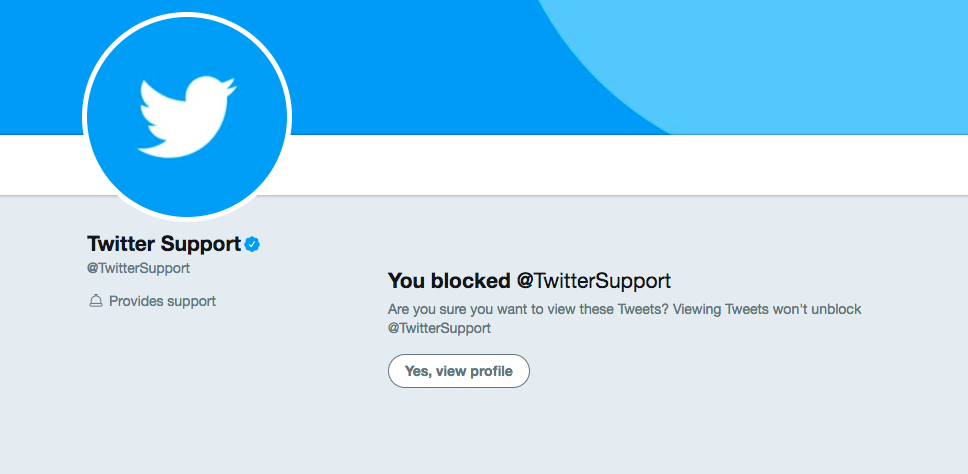
They also stop receiving notifications from you. X says the person who blocks will not receive notifications from accounts they block.
How to report an account that has blocked you on Twitter
Being blocked doesn't remove your options. X says you can still report an account that has blocked you.
- Select the more icon.
- Select Report.
- Provide the additional information X asks for.
When you report, X says you will have the option to include posts that mention you. The exception is an account that has protected its posts and that you don't follow.
Use this only for real rule violations. A block by itself is someone using a feature as intended.
What happens if they unblock you on X
Unblocking removes the state, and nothing else. The restrictions on following, messaging and engaging no longer apply.
The old follow does not come back. X says that if you decide to unblock an account, you will have to follow that account again, and the same holds for the other person.
X documents no notification for an unblock either. You would find out the same way you found the block: by visiting the profile.
Mistakes to avoid when you check for a block on Twitter
Three slips lead people to the wrong conclusion:
- Checking while logged out. The block is between two accounts, so the message appears only when you visit from the account that was blocked.
- Trusting an old screenshot. X doesn't publish the message text, and wording you saw elsewhere may not match.
- Reading silence as a block. No replies and no likes can mean a mute, a break from X, or nothing at all.
One more point is about conduct and not detection. If the message is there, don't try to reach the person through a second account.
A block is a clear request for distance, and respecting it is the only good next move.
Knowing if you're blocked on Twitter, in short
One check answers it. Open the person's profile while logged in, and look for X's message alerting you of the block.
Other signs support it: the follow that vanished, the Direct Message that won't send, the reply you can't post. None of them replaces the message.
Seeing their public posts doesn't rule a block out, and a missing post doesn't prove one. If the profile shows no message, look at the look-alike states above, then let it rest.
Common questions about being blocked on Twitter
Can you block someone who has blocked you?
Yes. X says that if you have been blocked by another account, you can still block other accounts, including any that have blocked you.
Can a blocked account see a protected account's posts?
No. X says that if posts are set to protected, blocked accounts will not be able to see them, since they are shown only to followers.
Will the person who blocked you still see posts that mention them?
Only in limited cases. X says the blocker won't receive notifications from accounts they block, but may still see posts that mention them along with an account they have blocked.