How to get more Twitter followers without chasing follow-backs
Get more Twitter followers by keeping posts public, fixing your bio and pinned post, posting steadily and replying in your field.

The first trick many people try on X is following hundreds of accounts and waiting for follow-backs. It's also the one X's own rules restrict: follows are capped at 400 a day, and mass following and unfollowing can get an account suspended.
How do you get more Twitter followers?
Make the account worth following and easy to find: keep your posts public, give your profile a bio and a pinned post that say what readers will get, post on a schedule you can repeat, and reply with substance under posts in your niche. X's business basics on growing your following point the same way, under three headings: "Follow and engage," "Share your @handle" and "Post consistently."
The rest of this page covers the settings and habits in order, what visitors check on your profile, how X picks accounts to suggest, and why follow-back schemes stall.
How to get more followers on X, from settings to replies
Earning more Twitter followers takes two kinds of work: fixing a few settings once, then giving people a reason to follow every week.
Do them in that order, because every post and reply you publish sends visitors back to the profile those settings control.
Fix three X settings once
- Switch off Protect your posts if it's on. Go to Settings and privacy, then Privacy and safety, and under Audience and tagging turn off Protect your posts: a slider on iPhone, a checkbox on Android and the web. Approve any pending follow requests first, because X won't accept them automatically once you go public.
- Rewrite your bio. In Edit profile, on your profile page, use the 160 characters to say what you post, who it's for and why someone should follow.
- Pin the post that best shows your work. Use the menu at the top of the post to choose Pin to your profile, then select Pin again to confirm.
Protected posts stop growth before it starts:
- Anyone who doesn't follow you can't see them.
- They stay out of Google search.
- Your followers can't repost them.
- A reply you send to an account that doesn't follow you never reaches it.
X's page on how to protect and unprotect your posts has the switch for iOS, Android and the web.
Keep three Twitter habits every week
Post on a schedule you can repeat. Pick two or three topics and write short, conversational posts, the register X's business advice recommends. When your week is uneven, write ahead: x.com's composer has a calendar icon for picking a date and time, and anything scheduled sits under Unsent posts until it goes out.
Reply and quote inside your niche. Answer posts your future followers already read, and add what the original left out: a fact, an example, a better question. Quote a post when your view is worth a standalone post. X credits engaging with other people's posts with building relationships and making your account easier to discover.
Make your @handle easy to find off X. List it wherever people already find you (your site, business cards, email signature), and paste X's follow button onto your site; publish.x.com generates the code.
Under Discoverability and contacts in Privacy and safety, keep the settings that let others find you by email and phone switched on, so people who have you in their contacts can be shown your account.
Settings come first because each habit sends people to your profile.
A protected account or an empty bio wastes every visit the habits earn.
What visitors check on your Twitter profile before they follow
They check whether the profile promises something they want.
The top of an X profile shows your photo, name and handle, the bio, your location, link and join date, and your following and follower counts, all before the first post.
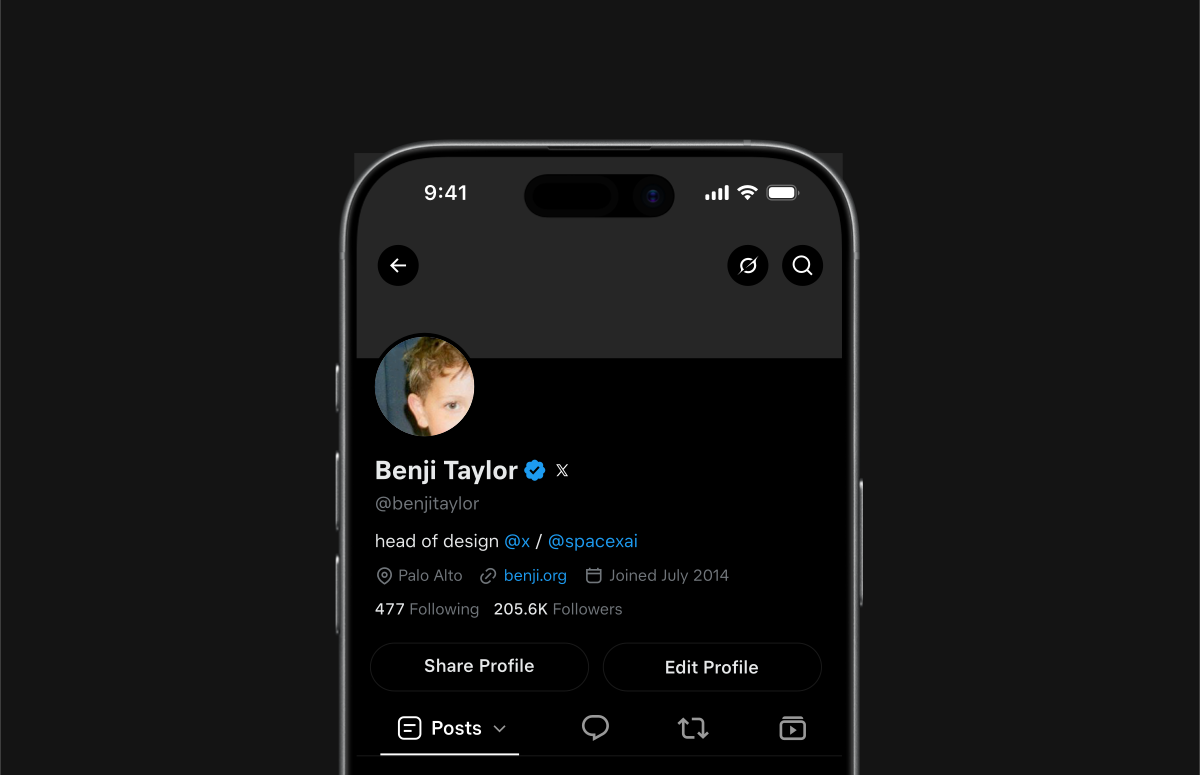
X adds a detail most profile advice misses: posts that received more engagement show in slightly larger text on your profile, so your best-performing posts are the easiest to spot.
Your pinned post and a few strong recent posts end up doing as much persuading as the bio.
Write the bio for someone who has never seen a single post of yours:
- What you post.
- For whom.
- One line of proof, such as a role, a result or a project.
X's business advice asks the bio to explain your work, its value to the reader and the reason to follow.
I'd rather read a narrow bio that is true than a clever one that could belong to anyone.
The photo and header do quieter work. X's advice is a profile image people recognize and a header that works like a billboard for whatever is new or timely.
The photo matters more than it looks: it's the small circle people see beside each of your replies.
What to post when you're growing an X account from zero
Post about two or three topics you can keep going on, in the plain, conversational voice X's business advice recommends, with an image, video, GIF or poll when it helps and one or two hashtags at most.
A visitor should be able to tell from your last five posts what following you will bring.
Formats that suit a small account share one trait: they carry something only you can add.
A few that work in almost any niche:
- A lesson from your own work, stated in the first line.
- A short how-to that solves one specific problem.
- A number from your own experience, with your reading of it.
- A question your niche genuinely argues about.
Some ideas need more room than 280 characters. Split them into a thread, or, on any Premium tier, publish one long post of up to 25,000 characters that everyone can read.
For ideas that already work on X, Creator Studio's Inspiration screen ranks top-performing posts from the last day, week or month by likes, replies and quotes. Study the formats that travel there, then write your own version from your own work.

How Twitter decides which accounts to suggest
X suggests accounts through its account recommendation system, which feeds the suggestion modules on the home timeline, on profile pages and in the signup flow. It ranks each candidate by how likely the viewer is to follow that account and engage with it positively.
Candidates come from a short list of documented sources: shared contacts, location, and the viewer's own activity, meaning the accounts they like, repost, mention, view or click.
The pipeline diagram on the same page adds accounts similar to ones the viewer recently engaged with and accounts followed by people the viewer recently followed, then filters out accounts the viewer has blocked, muted, reported or dismissed.

That gives you four levers:
- Engage within one niche, so you sit close to the accounts your ideal followers already interact with.
- Leave contact discoverability on, since contact matching is one of the documented sources of suggestions.
- Avoid replies that earn mutes, blocks or reports, since those actions are ranking signals in the same system and a health label can filter an account out entirely.
- Stay active: one ranking signal is an internal "user state" that X derives from how often an account logs in and posts each day.
Does follow-for-follow still work on X?
Not as a growth plan.
X's follow limits let every account follow up to 400 accounts a day. Once an account follows 5,000, X ties any further follows to its ratio of followers to following. Hit either limit and X shows "You are unable to follow more people at this time."
The rules reach further than the caps. X prohibits:
- Follow churn: mass following, then mass unfollowing, to pump up your own count.
- Following many unrelated accounts in a short time, particularly by automation.
- Copying another account's followers.
- Using or promoting apps that claim to add followers.
Break these and X can suspend the account; aggressive following is also one of the reasons X gives for locking accounts.
Even inside the limits, courtesy follow-backs make a thin audience. X's open-sourced For You code ranks every post by predicting what each viewer will do with it, from liking and replying to muting the author.
Followers who don't care about your topic add a number to your profile, and very little reach.
The "free followers" apps that promise a shortcut are worse. X's warning about them lists hijacked accounts, spam links posted in your name, forced follow sprees and fake followers.
What to do instead of trading follows
Put the accounts you want to reply to in a private List. X lets you add an account to a List without following it, and a private List is visible only to you, so you can read your niche every day without inflating your following count.
Then reply there first. Those conversations are where your replies get read by the people you want as followers, and where a follow comes from interest rather than courtesy.
What skipping these steps costs a growing Twitter account
Without the settings and habits, effort leaks out of the account:
- Replies from a protected profile never reach the people you answered.
- Visitors land on a bio that promises nothing.
- Follow-backs fill the count with people who never read your posts.
With them, every post and reply points to a public profile that says what you offer, a pinned post that proves it, and a steady stream of recent posts X can keep showing. That setup is what turns visits into Twitter followers.
Start with the three settings today, and let the weekly habits carry the rest.
X growth questions on timing, frequency and Premium
How long does it take to get your first 1,000 followers on X?
X doesn't publish a timeline, and results vary too much by niche and effort for one honest number. What X's published code does show is a lift for newer voices: authors whose impressions are still under a threshold get their posts nudged toward a set position in For You.
Track new followers week by week rather than day by day.
How often should you post to grow on X?
Often enough that something recent is always live. X names no number, but its For You code stops considering posts once they're more than 48 hours old.
It also discounts each extra post from the same author in one viewer's feed, so spread posts across the week instead of batching them.
Will a checkmark alone grow your X account?
Not by itself. Every Premium tier includes reply prioritization, and X says replies from verified accounts get "a slight preference," so Premium mainly helps the reply habit. Whether a visitor follows still depends on the profile and the posts.
Can you protect your posts again later?
Yes. Switching Protect your posts back on hides your posts from non-followers again, while accounts that already follow you keep their access unless you block them.