Find deleted Twitter posts: the copies that outlive a deletion and how to reach them
Find deleted Twitter posts through copies: Wayback Machine captures, replies and copies on X, or an old archive. Google's cache is gone.

A deleted post can't be pulled back out of X, but its copies can outlive it: saved pages, other people's posts and sites that quoted it.
Short answer: you find deleted Twitter posts by finding their copies, so look the post's link up in the Wayback Machine at web.archive.org, then search X and Google or Bing for its exact wording and for the replies it drew. The catch: Google's cached pages, which many guides still recommend, no longer exist, and a post that won't load may belong to a protected or deactivated account rather than being deleted.
Below: the steps, what a deletion leaves behind, why the archive can come up empty, where each kind of copy ends up, and how to save a post before it vanishes.
How to find deleted posts on Twitter with archives and search
To find deleted Twitter posts, start with the archive, because one capture can show the whole post, then work through the partial copies X leaves in place. Seven steps cover both, in that order.
Pull up an archived copy from before the deletion
- Copy the post's link. It reads
https://x.com/username/status/followed by a string of digits, and your browser history or the chat where it was shared may still have it. - Paste the link into the search field on web.archive.org. When the page was saved at least once, a calendar opens with each saved day marked.
- Open a capture from a day before the post vanished. Try the blue circles first; in the Internet Archive's color code, green means a redirect and orange or red means an error.
Try Twitter's old domain, then the account's saved posts
- Swap the domain. Change
https://x.comtohttps://twitter.comand search again, since older captures sit under the old domain. - List every saved post from the account. Open
https://web.archive.org/web/*/twitter.com/username/status/*with the handle filled in, and the archive returns each post address it holds for that account.
Run the post's wording through X, Google and Bing
- Search X for the exact wording in quotation marks, then for the replies. For replies, type
to:usernamewithsince:anduntil:dates around the posting day and switch to Latest. X's help on deleting posts says pasted copies, and quote posts that added a comment, stay up after a deletion. - Run the same wording through Google or Bing, in quotation marks. X says it can't remove copies cached or cross-posted on other websites or search engines, so news stories that quoted the post show up this way.
Checking the archive first saves time. When a capture exists it answers the question outright, and the searches only have to fill the gaps it leaves.
What deleting a post takes off X, and what it leaves behind
Deleting a post takes it off the author's profile, off followers' timelines and out of X search, and the reposts of it disappear too. X adds that the post's contents, its metadata and all its analytics stop being publicly available on X.
What a deletion doesn't touch is everything other people made from the post:
- posts that pasted part or all of its text
- quote posts that added a comment of their own
- replies, which belong to the accounts that wrote them, since X lets each account delete only its own posts
- copies cached or cross-posted on other websites, apps and search engines, which X says it can't remove
Every search in this article aims at that second list.
So a deleted post is missing from the one place most people check first, which is why the X search bar alone comes up empty.
Why doesn't the Wayback Machine have the deleted tweet?
The Wayback Machine holds a post only if a crawler or a person saved its page before the deletion, and nothing guarantees either happened.
The Internet Archive's Wayback Machine help explains the usual gaps:
- Its crawlers tend to find pages that other sites link to, so a post nobody linked may never have been visited.
- It doesn't archive pages that need a password, which keeps posts from protected accounts out.
- Account owners can ask the Internet Archive to exclude captures of their account, and excluded captures stop showing.
- Some captures saved an error instead of the page, shown as orange or red circles, and pages that need JavaScript to reach the original server don't replay properly, which is how X's post pages load their content.
- A new capture can take 3 to 10 hours to appear.
A missing capture tells you about the archive, not about whether the post ever existed.
One message has nothing to do with the post. If the Wayback Machine answers with a "too many requests" error, the Internet Archive's recent note on Wayback Machine access says that's a block on heavy automated traffic.
The note asks anyone blocked by mistake to email info@archive.org with their operating system, browser and IP address.
Where to look first for a deleted Twitter post, depending on whose it was
Whose post it was decides which copies can exist, so match your case before you start:
| Whose post | Where copies can survive | Look here first |
|---|---|---|
| A public account's post | Archive captures, pasted copies, quote posts, replies and pages that quoted it | The Wayback Machine, then the searches |
| Your own post | An X archive you downloaded before deleting it, plus everything in the row above | Your oldest archive download |
| A post from an account that no longer exists | Archive captures of the profile and its posts | The account's /status/* listing in the Wayback Machine |
| A post from a protected account | Only what approved followers saved, such as screenshots | People who followed the account |
The protected case is the hardest. X keeps protected posts out of third-party search engines like Google, and the Internet Archive doesn't save pages behind a login, so neither route is likely to hold them.
X's help on protected posts does warn that followers can still capture images of them and share them. That makes an approved follower the realistic source, and a screenshot the likeliest form the post survives in.
Your own posts are the easiest case when you planned ahead. An archive download holds your exact wording and the date, where every other copy is someone else's version of it.
Why sites that embedded a deleted X post can still hold its words
A website that embedded the post can keep its text after the deletion, because X's embed code puts the words inside that site's own page.
X's developer documentation for its oEmbed API shows the code a site pastes in. It's a quote block holding:
- the post's text
- the author's name and handle
- the date
- a link back to the post
X's script then turns that block into the styled embed readers see. X calls the block fallback markup, meant to be cached on the site's own servers for a suggested period.
X says it can't remove posts that live on other sites.
So a news story or blog that embedded the post is worth opening even when the embed no longer displays properly, since the text may still sit in the page's source. Searching the post's exact wording in quotation marks is how you find those pages, because the words are part of each page.
What happened to Google's cached copies of deleted Twitter posts?
They're gone.
Google retired its cached pages, and its robots meta tag documentation says the cached link feature no longer exists, which rules out the cache: searches older guides still describe.
Search engines still help in a narrower way. A search for a post's exact words can find other pages that quoted or embedded it.
X's privacy policy also notes that search engines and other third parties may keep copies of posts longer than X does, under their own policies.
How to save an X post before it can be deleted
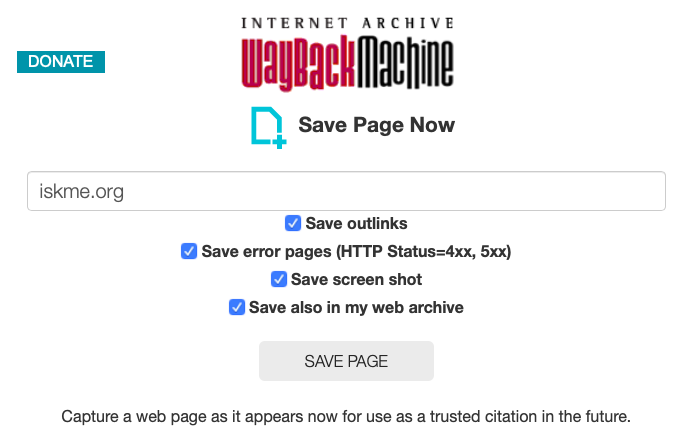
Save it yourself while it's still public. The Wayback Machine's Save Page Now captures a page on request and hands you a permanent link to the copy.
The Internet Archive's help pages say a saved page keeps existing after the original is removed, which is exactly the protection a post needs.
- Open
https://web.archive.org/savein any browser. - Paste the post's link and press Save Page.
- Keep the permanent link it gives you, since it works as a citation anyone can check later.
The form itself is one address box, a few options and a Save Page button. Signing in adds extras such as a screenshot of the page and an emailed copy of the results.
Your own posts have a second safety net. Request your X archive regularly: X says preparing it can take a few days, and each download is a snapshot of your account on the day you asked.
A deleted X post survives only where someone saved it
Every way back to a deleted post runs through a copy someone made before it went.
Run the archive check and the searches above now, and save the next post you might need before it has a chance to disappear.
Four more questions about deleted tweets on X
Can you get back a tweet you deleted yourself?
Not from X, which describes no way to restore a deleted post and keeps what you post only until you remove it. An X archive downloaded before the deletion still holds it, because X calls the archive a snapshot of your information.
X doesn't say whether a newly requested archive includes posts you've already deleted.
How can you tell a deleted tweet from a hidden one?
Look at the account first. X shows a post as unavailable when it was deleted, when the account is protected and you don't follow it, and when the account is deactivated.
A deactivated account can come back within 30 days, and protected posts turn public again if the owner unprotects them.
Can you find the photos from a deleted tweet?
Sometimes. A capture shows a broken image when the image file itself wasn't archived, and the Internet Archive says pasting that image's own address into the Wayback Machine search tells you whether the file was saved.
Screenshots other people posted are the other place to look.
Can other people still find a tweet you deleted?
Yes, wherever a copy survives, and X says it can't remove copies on other websites or search engines.
For the archive, the Internet Archive reviews exclusion requests sent to info@archive.org that name the addresses and time period involved. For Google, the Refresh Outdated Content tool asks Google to update a result for a page that no longer exists.