Download a Twitter video from a post, a DM or your own account
Download a Twitter video from X's three-dot menu with Premium, or use your X archive, a DM long press or a web downloader without it.

Can you save a Twitter video when the post has no download button? Yes, and where the clip lives decides how.
How do you download a video from Twitter?
With X Premium, open the video in the X app, tap the three-dot icon in its top right corner and tap Download video. Without Premium, press and hold a video someone sent you in a Direct Message, request your X archive for clips you posted, or save a public post's clip with a web-based downloader.
The sections below match each route to the clip it fits and list what can block it.
How to download a Twitter video from someone's post
Posts are the one place where X's help ties its download option to a subscription.
With X Premium, you can download Twitter video files from a post in three taps, and X's help on videos describes them for the app:
- Go to the video you want to save.
- Tap the three-dot icon in its top right corner.
- Tap Download video to save the file to your device.
Because the file comes from X itself, this route skips everything that goes wrong elsewhere: copied links, unknown sites and re-recorded footage.
On a video playing full screen, the three-dot icon sits in the top right corner, above the clip, as in this App Store screenshot of X's player.

X's help also says what these downloads are for: offline viewing, or remixing the clip into new content.
The uploader still gets a say in whether their video is downloadable, as the conditions below show.
The four conditions behind X's download option
X offers Download video on a post only when all four conditions in its help hold:
| Condition | What happens when it fails |
|---|---|
| You subscribe to X Premium | Posts show no Download video item |
| The video went up on or after July 25, 2023 | Older videos stay non-downloadable |
| The uploader left Allow video to be downloaded on | The opt-out, set while posting, can't be undone later |
| The uploader's account is 18 or older | Downloads stay off, with no way to switch them on |
The date row matters most for older clips.
Anything posted before July 25, 2023 stays locked, whatever you pay.
Check the X post's date before you try
A post's own page tells you whether the date rule applies. X's help on permanent links on X says that viewing a post's permanent link shows the exact time and date it was posted.
Open the post itself, compare that date with July 25, 2023, and you'll know right away whether a missing Download video item is about age rather than the uploader's settings.
How to save a video someone sent you in an X DM
Direct Messages have their own route to download a Twitter video, and X's help doesn't attach a subscription to it.
Press and hold the video in the conversation, then tap Download video.
Whether that works depends on the sender's app and settings, not yours.
X's help says it covers videos sent from version 10.24 or later of the X app for iOS or Android, and only if the sender left Allow video to be downloaded on when sending. Once the message is out, the sender can't change that choice.
With no subscription involved, a DM is the easiest fix when a friend or colleague has the clip you want.
Ask them to send the video file itself in a message, not a link to the post, and save it from the conversation.
X describes this route only for the iOS and Android apps, so open the conversation on your phone rather than on x.com.
How to download your own Twitter videos from the X archive
Clips you posted yourself come back in your X archive, a .zip of your account data that every account can request. X's help lists the images, videos and GIFs you've attached to posts and Direct Messages among its contents.
On x.com, X's archive instructions begin at the More menu:
- Click More in the navigation bar, then Your account.
- Click Download an archive of your data, then enter your password and confirm.
- Send yourself a verification code by email or phone, enter it, then click Request data.
- Download the .zip once it's ready, in the same browser where you're logged in to X.
X says preparing the archive may take a few days, so request it before you need the clip, and confirm your email address on X first, as its help asks.
It's also the one X route that ignores the July 25, 2023 cutoff, which makes it the way to download X videos you posted before that date.
When the .zip lands, you don't have to dig through raw files. X describes the archive as a snapshot of your account that you can browse, starting with your very first post.
Saving someone else's Twitter clip without a subscription
When the clip isn't yours and you don't pay for Premium, X gives you no download button, which leaves two routes.
The better one is asking.
The uploader has the original file that X's copy was made from, and one message can get you both the clip and permission to use it. If they attach the video to a DM, you can even save it through X, as covered above.
Say where you plan to use the clip when you ask. It helps the uploader decide, and it's the permission you'd need anyway if the video ends up anywhere public.
The other is a web-based downloader, the usual way to download a Twitter video you don't own.
Copy the post's link through its share icon and Copy link to Post (on an iPhone, tap Share Post via first), the steps X's help gives for copying links. Then paste it into the downloader and save the file it hands back.
Treat those sites as strangers.
Give them the public link and nothing else, never your X password, and close any that insist on installing an app or extension first. Keep them for public posts and for clips you're allowed to keep.
Is screen recording a Twitter video a good backup?
Only as a last resort, and only for a clip you're allowed to keep.
A screen recording captures your display rather than X's file, so the video is re-encoded at your screen's resolution and records anything that appears on top of it.
If you have to record, three habits keep the copy usable:
- Silence notifications before you start, so none land in the recording.
- Play the clip full screen, so the recording gets every pixel your screen can give it.
- Trim the first and last seconds afterwards, where the player controls and your taps show up.
Even done well, the result is a copy of a copy. Any route above beats it when that route is open to you.
How to stop people downloading your X videos
Your videos are downloadable by default.
Since July 25, 2023, X has let Premium subscribers download the videos you post unless you switch the option off while writing the post.
The switch sits behind the video in the composer:
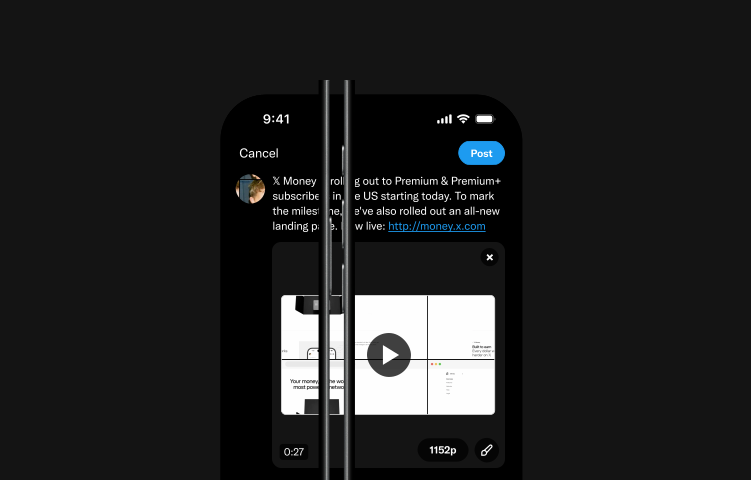
- After adding a video to a new post in the X app, tap Edit at the bottom right of the video.
- Tap Settings.
- Turn off Allow video to be downloaded.
In X's own composer mockup, that edit control is the brush icon at the bottom right of the attached video.
Your X download setting can't be changed after posting
Decide before you post. X's help says the setting can't be changed later, so stopping downloads afterwards means deleting the post.
The same switch appears when you attach a video to a Direct Message, and it locks once the message is sent.
That timing matters most for clips you plan to sell, license or reuse in paid work. Once downloads are on and the post is live, any Premium subscriber who opens it can keep a copy.
The switch belongs to each video, set in the composer as you post it. You can leave downloads on for a clip you want shared widely and turn them off for the next one.
Switching downloads off also blocks one kind of sharing: X users can't share the clip directly to other platforms, though they can still share a link to your post.
Accounts run by people under 18 don't need to touch any of this. X turns their download setting off automatically and keeps it that way.
Protected posts still let followers download
Protecting your posts narrows who sees your videos, not what they can do with them.
X's help says followers may download videos shared in protected posts or re-share links to them, and that links to videos on X aren't protected, so anyone with the link can watch.
If a video must not travel, X's advice is to delete the post that contains it.
What the wrong Twitter download route costs you
Pick the wrong way to download a Twitter video and you pay in time, quality or goodwill:
- A screen recording where X would have handed you the file.
- A days-long archive request for a clip a friend could have sent in a DM.
- A repost the creator never agreed to.
Pick the right one and you get X's own copy of the video by the shortest path your situation allows.
Start with where the clip lives, and the route follows.
Quick questions about saving X videos
Which X Premium plan includes video downloads?
X doesn't say. Its video help credits downloads to Premium subscribers without naming a tier, and the tier descriptions on X's Premium page don't mention downloads at all.
If downloading is the reason you'd subscribe, check the feature list on the app's subscribe screen before you pay.
Is it okay to download someone else's Twitter video?
For your own viewing through X's option, yes: the item only appears when the uploader left downloads on. For any other route, or before you post the clip anywhere, ask the uploader first, since saving a copy doesn't make the video yours.
Does a downloaded X video keep its full resolution?
At most, it keeps the resolution of the copy X stored. X's help limits web uploads to 1920 x 1200 pixels, or 1200 x 1900 in portrait, so that is the ceiling for any download.
Can you download a Twitter video on a computer?
X's help doesn't describe a desktop route: its Download video steps are written for the app, with a tap at each stage.
On a computer, your X archive covers the clips you posted, and a web-based downloader covers public posts.