Ideas to Improve Search Position Using Google Search Console
Use Google Search Console data to find striking distance keywords, fix CTR gaps, spot content decay early, and diagnose ranking drops before they cost traffic.

Most people open Google Search Console once a month, glance at the average position graph, notice it went up or down a little, and close the tab. That's not analysis, that's a status check. GSC is treated like a speedometer when it's actually closer to a diagnostic scanner: it will tell you exactly which pages are underperforming, why they might be underperforming, and what to try next, if you know where to click.
The problem is that "average position" as a single number is nearly useless on its own. A site can have a flat or even declining average position while individual pages are gaining ground, because the metric blends everything together. The real work happens when you segment the data: by query, by page, by date range, by device. That's where GSC stops being a dashboard and starts being a tool you can act on.
Why Search Console Is Still One of the Highest-Leverage Free SEO Tools
Search Console is the only place you get first-party data straight from Google about how your pages actually show up in search results: the exact queries, the impressions, the clicks, the position, broken down by page. Rank trackers estimate. GSC reports. That distinction matters because every tactic below depends on the data being real, not modeled.
It's also underused precisely because it isn't opinionated. It doesn't tell you "fix this." It gives you raw signal and expects you to form a hypothesis, make a change, and come back to check the result. That's a slower workflow than a tool that hands you a prioritized to-do list, but it's also more accurate, because you're working from your own site's actual search behavior instead of a generic scoring model.
The Walkthrough: 10 Concrete Ways to Use GSC to Move Rankings
1. Hunt for striking distance keywords
Go to Performance, filter Position to a range of roughly 8 to 20, and sort by Impressions. These are pages Google already considers relevant enough to place on page one or two, but not relevant or authoritative enough to push higher. High impressions at that position range mean there's real search demand and you're already in the game. This is a far shorter path to a ranking gain than building a new page from zero: add depth to the existing content, tighten the title tag around the exact query, and add a subheading that mirrors the phrasing searchers are using.
2. Chase high impressions, low CTR pages
In the same Performance report, add a CTR column and look for pages with impressions well above their click count relative to their position. If a page ranks around position 4-6 but its CTR is far below what you'd expect for that position, something in the SERP is intercepting the click: a featured snippet, a People Also Ask block, or simply a title and meta description that don't match what the searcher wants. Rewrite the title to front-load the specific answer or benefit, and rewrite the meta description as an actual pitch for the click, not a summary of the page.
3. Compare date ranges inside Performance before a page fully drops
Use the date picker's "Compare" option to set last 28 days against the previous 28 days, or the same period last year for seasonal content. Sort by the biggest negative change in clicks or position. This surfaces pages that are sliding before they've fallen off page one entirely, which is the point where a refresh is cheap and effective. Waiting until a page has vanished from the top 20 makes recovery much harder.
4. Use Pages and Queries together to find content gaps
Open the Pages tab, click into an individual URL, and the report filters to show every query that page ranks for. Look for queries where the page ranks weakly (position 15+) but gets meaningful impressions. If a query doesn't have a corresponding subheading, paragraph, or FAQ entry on the page, that's a specific, low-effort addition: write a section that directly answers that query. You're not guessing at what to add, GSC is telling you what people are already searching for and finding this page for.
5. Check the Links report for internal linking gaps
Under Links, look at "Top linked pages" for your internal links. Pages with very few internal links pointing to them are often pages you've effectively orphaned, even if they're technically reachable. Cross-reference against pages that are underperforming in Performance: a page with strong content but almost no internal links carrying authority to it is a common, fixable cause of a stuck ranking. Add contextual links from your higher-authority pages down to it.
6. Read Core Web Vitals and page experience data as one input, not the fix
The Core Web Vitals report (and the broader Experience section) will flag pages with poor loading, interactivity, or layout stability scores. Fixing these matters, but treat it accurately: page experience is one of many ranking signals, not a lever that alone moves a page from position 15 to position 3. Use it to rule out technical drag on pages that otherwise have strong content and links but underperform anyway.
7. Check the Pages report (Coverage/Indexing) for crawled but not indexed pages
In the Pages section under Indexing, look specifically at "Crawled, currently not indexed" and "Discovered, currently not indexed" buckets. A page sitting in either of these states can't rank at all, no matter how good the content is. Common causes are thin content, duplicate or near-duplicate content elsewhere on the site, or the page simply not being seen as valuable enough relative to what's already indexed. Strengthen the content or consolidate it into a stronger existing page, then request indexing again through URL Inspection.
8. Use URL Inspection to diagnose one specific underperforming page
When a single important page isn't behaving as expected, run it through URL Inspection. Check the indexing status, run the live test to confirm what Google currently sees versus what's cached, and check the mobile usability status at the page level. This is the right tool when you have one page you care about, rather than a site-wide pattern, and you want to confirm there isn't a basic technical block (a stray noindex, a canonical pointing elsewhere, a blocked resource) before you spend time on content changes.
9. Use the Sitemaps report to confirm what you think is submitted actually is
Check that your sitemap is listed as "Success" and look at the discovered versus indexed count. A gap between the number of URLs submitted and the number actually indexed is a signal worth investigating through the Pages report. This is a quick five-minute check that catches technical issues (a sitemap that stopped updating, a section of the site that got excluded) before they quietly suppress rankings for weeks.
10. Watch Queries at the property level for emerging terms you don't have a page for
Beyond page-level analysis, sort the top-level Queries tab by impressions and look for terms with real volume where you don't have any page ranking in a meaningful position, or no page targeting the term at all. These are gaps in your content plan that GSC surfaces because Google is already trying to match your site to that query on the strength of related content you have. That's a strong signal to build a new page rather than force an existing one to cover it.
Practical Tips: Sample Size, Review Cadence, and Avoiding Noise
Don't act on a week of data. GSC's own numbers get noisy at low volumes, and a page with under roughly 100-200 impressions in a period is too thin to draw a confident conclusion from a CTR or position change. Wait for at least a few weeks of data, or until impression counts are large enough that a swing of a few clicks doesn't flip your read on the page.
A reasonable cadence: a lightweight check every one to two weeks (watching for date-range comparison flags on your highest-value pages), and a deeper monthly pass through striking distance keywords, the Pages/Queries cross-reference, and the Links report. After you make a change to a page, give it at least three to four weeks before judging the result, since Google needs to recrawl, reprocess, and let rankings settle.
Also be careful with position averages on pages that rank for a very wide spread of queries, some at position 3 and some at position 40. The blended average can look stable while the underlying mix is shifting in ways worth knowing about. Always check the query-level breakdown before concluding a page is "fine."
Position Isn't Just a Website Metric Anymore
In July 2026, Google extended Search Console with a new property type: alongside the standard URL-prefix and domain properties, site owners can now register a platform property for Instagram, TikTok, X, or YouTube, and see how that content performs specifically inside Google Search and Discover. That's Google saying plainly, through the same tool you already use to track your website, that content living on social and video platforms is part of what's showing up, and being measured, in search results.
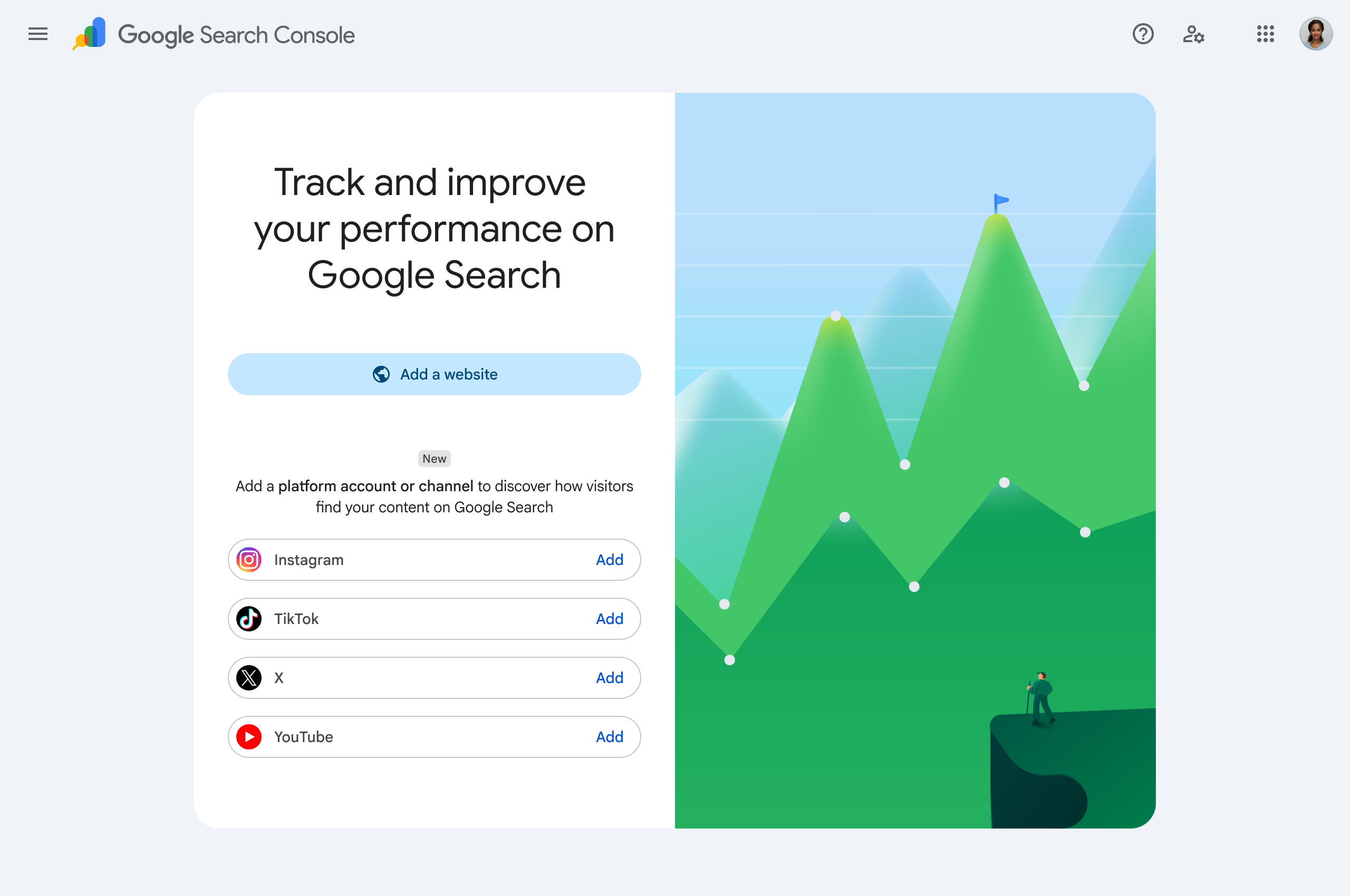
That changes what "improving search position" means in practice. It's no longer purely a website exercise of titles, internal links, and page speed. Branded search demand (people searching your name or product directly), the topical signals that reinforce what entity you are, and Discover surfacing all get shaped by what you publish across Instagram, TikTok, X, and YouTube, not just what's on your domain. A page can be technically flawless and still underperform if the brand behind it has a thin or inconsistent footprint everywhere else Google is watching.
Practically, this means the same discipline you apply to Performance data in GSC (consistent output, tracking what resonates, refining based on what actually gets engagement) now has to extend across platforms, not just pages. That's a publishing and cadence problem as much as it's a content problem, and it's where a tool like Circleboom fits into the broader picture rather than as a separate task. The X Post Planner gives you one workspace to write, schedule, and queue posts and threads, and the AI Writer learns an account's voice through onboarding so output stays consistent and on-topic instead of sporadic. Native cross-posting from that same composer to LinkedIn, Threads, Bluesky, Facebook, and Instagram, combined with AI-suggested posting times based on actual audience activity, means the X-based workflow already extends into other platforms Google now explicitly tracks. Circleboom's broader platform also handles scheduling and publishing automation for Instagram, TikTok, and YouTube directly, so maintaining a steady, on-topic cadence across the platforms feeding into Search and Discover doesn't require juggling four separate tools and four separate habits.
The takeaway isn't that social posts replace on-site SEO work. It's that the two are now visibly connected in the same reporting environment, and treating them as separate disciplines is going to leave signal on the table.
FAQ
Does average position in GSC match what I actually see when I search? Not exactly. GSC's position is an average across all impressions for a query, including personalized results, different countries, and different devices, so it can differ from what you see searching manually. Use it directionally, not as a literal ranking checker.
How many impressions do I need before I trust a CTR or position number? There's no official threshold, but as a working rule, treat anything under roughly 100-200 impressions in the period you're viewing as too thin to act on confidently. Wait for more data or widen the date range.
Can Core Web Vitals alone fix a stuck ranking? No. It's one signal among many. If a page has strong content, solid internal links, and reasonable indexing but still underperforms, Core Web Vitals is worth checking, but it's rarely the single cause of a stalled ranking on its own.
What's the difference between "Crawled, currently not indexed" and "Discovered, currently not indexed" in the Pages report? "Discovered" means Google knows the URL exists but hasn't crawled it yet, often a crawl budget or priority issue. "Crawled, currently not indexed" means Google fetched the page but chose not to index it, usually a content quality or duplication issue. They call for different fixes.
Does GSC tell me why a ranking changed? No, and this is worth being disciplined about. GSC shows what happened (clicks, impressions, position, by page and query) but not why. Treat every pattern you spot as a hypothesis, make one change at a time where possible, and use the date comparison view to check whether it actually worked.
What are the new platform properties in Search Console for? As of July 2026, Google Search Console supports registering Instagram, TikTok, X, and YouTube as property types, separate from your website property, so you can see how that platform's content performs in Google Search and Discover results, using the same Performance-style reporting you already use for your site.
If you've never done a striking distance pass or looked at the Pages and Queries cross-reference for your top pages, that's the place to start this week, before circling back to how your social platforms are contributing to the same search visibility.